Operating Instructions — JM-1P (Legacy)
Arrayable Loudspeaker

The JM-1P self-powered loudspeaker is a high-Q, arrayable loudspeaker suited for a wide range of applications. Utilizing Meyer Sound's patented REM™ technology and trapezoidal cabinet design, the JM-1P can be deployed in tightly packed array clusters to deliver coverage that is proportional to the number of units in the array. While JM-1P point source arrays are optimized for horizontal installations, they can also be used vertically when necessary. With its scalable coverage and versatile QuickFly® rigging options, the JM-1P loudspeaker can be used for touring, rental, and fixed installations.
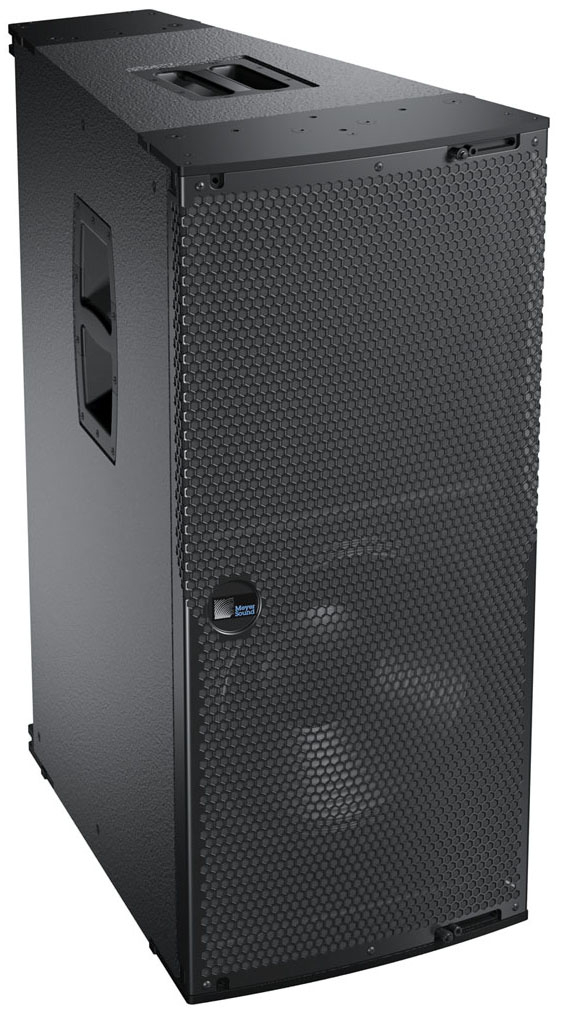
JM-1P Arrayable Loudspeaker
Boasting a wide operating frequency range of 53 Hz to 18 kHz, the JM-1P delivers a remarkably smooth sound with ample low-frequency headroom. Designed and manufactured at Meyer Sound headquarters in Berkeley, California, the JM-1P's drivers include one low-frequency 15-inch long excursion cone driver, and one high-frequency 4-inch compression driver with an REM manifold coupled to an extremely accurate horn. The JM-1P is distinguished by its constant-Q horn that provides a 20-degree horizontal by 60-degree vertical coverage. The unit's consistent polar response and trapezoidal enclosure allow for tightly packed arrays with minimal overlap in high frequencies.
The JM-1P's sophisticated onboard amplification and processing produces consistent and predictable results in any system design. A proprietary two-channel, class AB/H power amplifier with complementary MOSFET output stages yields a total power output of 1275 W (2550 W peak). Built- in signal processing includes an electronic crossover, driver protection, and correction filters for achieving flat phase and frequency responses. Each amplifier channel has peak and rms limiters that prevent driver overexcursion and regulate voice coil temperatures. Limiting activity is easily monitored with the rear panel limit LEDs. The optional RMS™ remote monitoring system provides comprehensive monitoring of system parameters on a Windows®-based computer.
The JM-1P's end plates include captive GuideALinks™ and quick-release pins that allow the unit to be easily linked with other JM-1Ps in arrays. The optional MPA-JM1 pickup plate suspends JM-1P horizontal arrays of up to four units with uptilt or downtilt from a single hanging point; two pickup plates can suspend arrays of up to six units from a single hanging point or motor using the MTGSB-4B spreader bar.
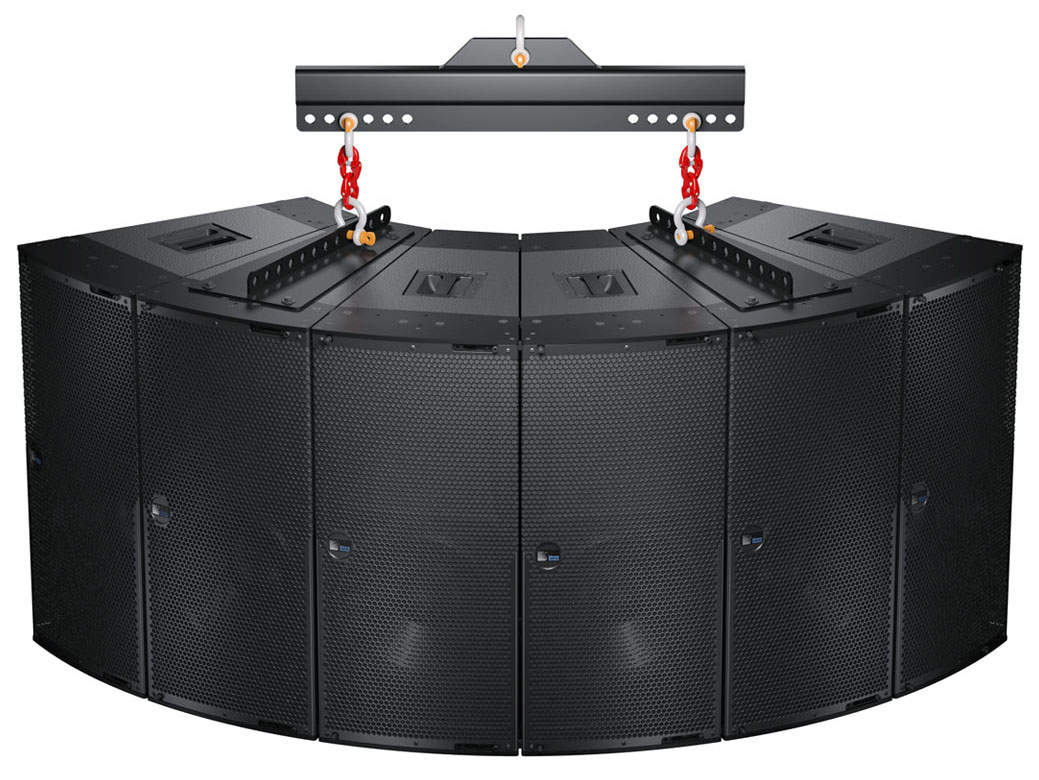 |
JM-1P Horizontal Array with MPA-JM1 Pickup Plates and MTGSB-4B Spreader Bar
The optional MTG-JM1 grid suspends vertical arrays of up to six JM-1Ps.
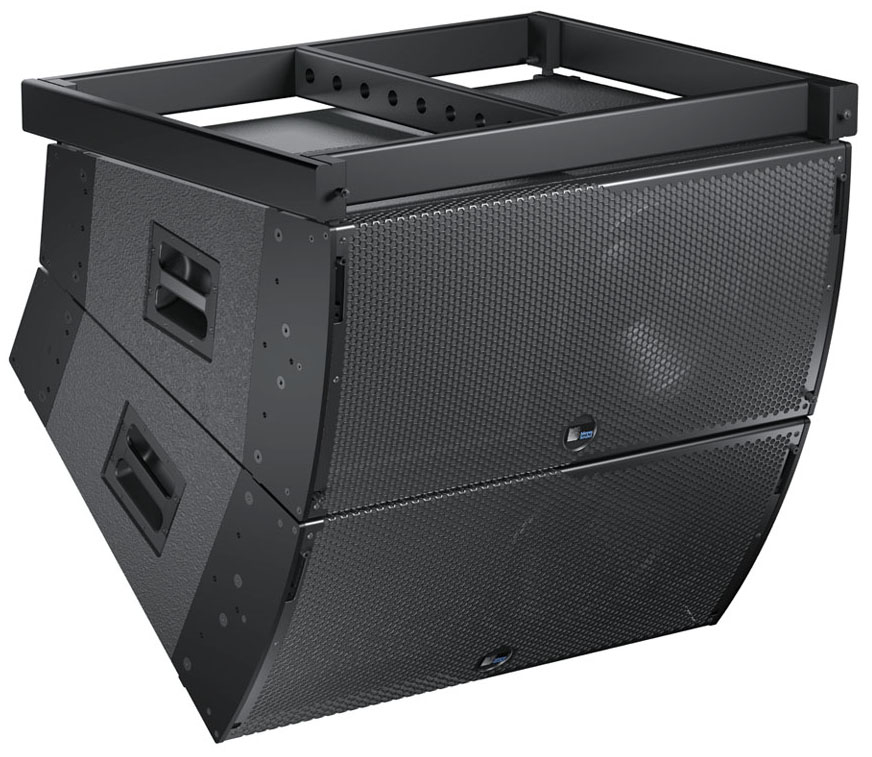
MTG-JM1 Vertical Grid with Two JM-1Ps
Constructed of premium birch plywood, the durable JM-1P enclosure is coated with a black-textured, hard-shell finish. A hex-stamped, steel grille with acoustical black mesh protects the unit's drivers. Other options include weather protection and custom color finishes for fixed installations and applications with specific cosmetic requirements. The optional MDB-JM1 dolly board transports the JM-1P on caster wheels; multiple dolly boards can be interlocked to transport up to three linked JM-1Ps.
Power Requirements
The JM-1P loudspeaker combines advanced loudspeaker technology with equally advanced power capabilities. Understanding power distribution, voltage and current requirements, as well as electrical safety issues, is critical to the safe operation of the JM-1P.
AC Power Distribution
All components in an audio system (self-powered loudspeakers, processors, etc.) must be properly connected to an AC power distribution system, ensuring that AC line polarity is preserved and that all grounding points are connected to a single node or common point using the same cable gauge as the neutral and line cables.
Note
Improper grounding connections between loudspeakers and the rest of the audio system may produce noise or hum, or cause serious damage to the input and output stages of the system’s electronic components.
Caution
 48 VDC (-) and Audio shield.
The figure below illustrates a basic three-phase AC distribution system with the loudspeaker load distributed across the three phases. All loudspeakers are connected to common neutral and earth-ground points.
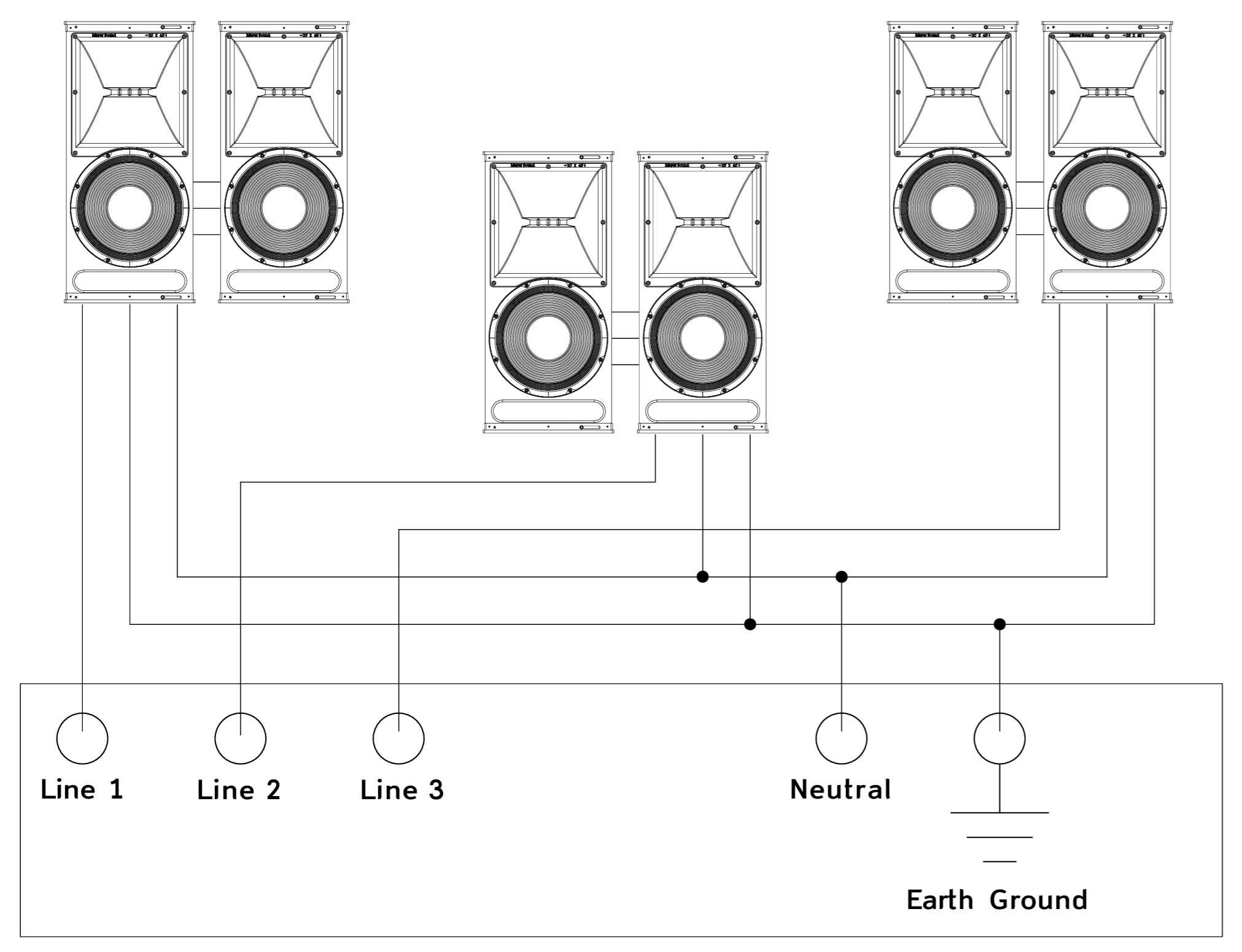 |
Figure 1: AC Power Distribution System
AC Connectors
The figure below shows the user panel on the back of the JM-1P includes PowerCON AC connectors.
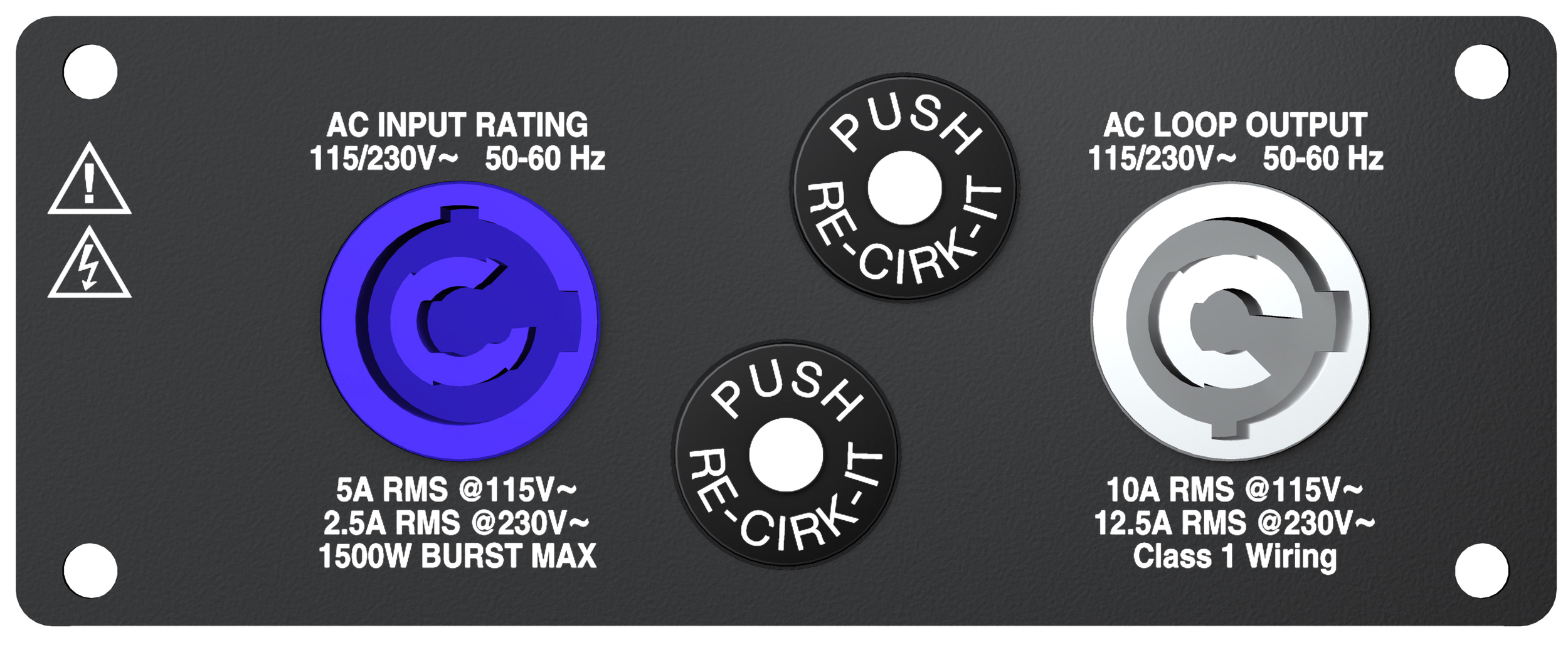 |
Figure 2: JM-1P AC Input (left) and AC Loop Output (right) Connectors
AC Input Connector (Blue)
The blue AC Input connector supplies power to the JM-1P. The connector is rated at 20 amps and uses a PowerCon AC mains locking connector that prevents accidental disconnections. A 10-foot AC power cable, rated at 15 amps, is included with each loudspeaker. If you replace the included AC power cable, make sure to use a cable with the appropriate power plug (on the other end) for the area in which you will operate the unit.
The AC Input connector also supplies power to any additional loudspeakers connected to the loudspeaker’s gray Loop Output connector. Each JM-1P loudspeaker requires approximately 5 A rms (maximum long-term continuous current) at 115 V AC for proper operation.
Caution
When using the included AC power cable, do not loop more than two additional JM-1P loudspeakers from the AC Loop Output connector at 115 V (three total for the circuit), and not more than five at 230 V (six total for the circuit).
AC Loop Output Connector (Gray)
The gray AC Loop Output connector allows multiple JM-1P loudspeakers to be looped and powered from a single power source. Connect the AC Loop Output of the first loudspeaker to the AC Input of the second, and so forth. The AC Loop Output uses a PowerCon3 AC mains locking connector that prevents accidental disconnections.
The maximum number of loudspeakers that can be looped from the Loop Output connector is determined by the voltage of the power source, the circuit breaker rating, and the rating of the AC power cable connected to the first JM-1P loudspeaker.
Circuit Breaker/ Connector Rating | 115 V AC | 230 V AC | 100 V AC |
|---|---|---|---|
15 amps | 2 looped (3 total) | 5 looped (6 total) | 1 looped (2 total) |
20 amps | 3 looped (4 total) | 7 looped (8 total) | 2 looped (3 total) |
Each JM-1P loudspeaker ships with one AC looping connector for making AC looping cables. Assembled AC looping cables are available from Meyer Sound (15-inch UL AC looping cable, PN 28.115.032.01; 0.35 m CE AC looping cable, PN 28.115.032.02).
Caution
Do not exceed the current capability of the 20-amp Input connector for the JM-1P loudspeakers. When looping loudspeakers, consider the total current draw for all loudspeakers on the circuit, including the first loudspeaker.
Power Connector Wiring
The JM-1P requires a grounded outlet. To operate safely and effectively, it is extremely important that the entire system be properly grounded.
 |
Figure 3: AC Cable Wiring Scheme
When wiring international or special-purpose power connectors:
Connect the blue wire to the black terminal, or the terminal marked with an N.
Connect the brown wire to the red terminal, or the terminal marked with an L.
Connect the yellow and green wire to the green (or green and yellow) terminal, or the terminal marked with an E.
Caution
When creating AC power cables and distribution systems, it is important to preserve AC line polarity and connect the earth ground on both ends of the cable. The JM-1P requires a grounded connection. Always use a grounded outlet and plug. It is extremely important that the system be properly grounded in order to operate safely and properly. Do not ground-lift the AC cable.
JM-1P Voltage Requirements
The JM-1P operates safely and continuously when the AC voltage stays within 95–125 V AC and 208–235 V AC at 50 or 60 Hz. The JM-1P allows any combination of voltage to GND (neutral-line-ground or line-line-ground).
If the voltage drops below 85 V (brownout), the JM-1P uses stored power to continue operating temporarily; the loudspeaker will shut down if the voltage does not rise above the low boundary before the stored power is used.
If the voltage rises above 235 V, the power supply could become damaged.
Caution
The power source for the JM-1P should always operate within the required voltage range, at least a few volts from the upper and lower ranges. This will ensure that AC voltage variations from the service entry — or peak voltage drops due to cable runs — will not cause the loudspeaker’s amplifiers to cycle on and off or cause damage to the power supply.
Powering Up the JM-1P
When AC power is applied to the JM-1P, its Intelligent AC™ power supply automatically selects the correct operating voltage, allowing it to be used internationally without manually setting voltage switches. In addition, Intelligent AC also suppresses high-voltage transients up to several kilovolts, filters common mode and differential mode radio frequencies (EMI), and sustains operation temporarily during low-voltage periods.
When powering up the JM-1P, the following startup events take place over several seconds.
Audio output is muted.
Voltage is detected and the power supply mode is automatically adjusted as necessary.
The power supply ramps up.
The green On/Temp LED on the user panel lights up, indicating the loudspeaker is ready to output audio.
Note
The fan remains off at turn-on. It is controlled by audio level and operates only at high audio levels.
Caution
If the On/Temp LED does not light up, or the loudspeaker does not output audio after ten seconds, remove AC power immediately and verify that the voltage is within the required range. If the problem persists, contact Meyer Sound Technical Support.
If either of the loudspeaker’s circuit breakers trip (the white center buttons disengage), do NOT reset and reapply power. Instead, disconnect from AC power and contact the Meyer Sound Service Department for instructions on how to proceed.
JM-1P Current Requirements
The current draw for the JM-1P is dynamic and fluctuates as operating levels change. Since different cables and circuit breakers heat up at varying rates, it is important to understand the following types of current ratings and how they affect circuit breaker and cable specifications.
Idle Current — The maximum rms current during idle periods.
Maximum Long-Term Continuous Current — The maximum rms current during a period of at least 10 seconds. The Maximum Long-Term Continuous Current is used to calculate temperature increases for cables, to ensure that cable sizes and gauges conform to electrical code standards. The current rating is also used as a rating for slow-reacting thermal breakers. In addition, the Maximum Long-Term Continuous Current can be used to calculate the AC looping capability of the JM-1P.
Burst Current — The maximum rms current during a period of around one second. The Burst Current is used as a rating for magnetic breakers. It is also used for calculating the peak voltage drop in long AC cable runs according to the following formula:
V pk (drop) = I pk x R (cable total)
Ultimate Short-Term Peak Current — A rating for fast-reacting magnetic breakers.
Inrush Current — The spike of initial current encountered when powering on.
Use the table below as a guide for selecting cable gauges and circuit breaker ratings for the system’s operating voltage.
Current Draw | 115 V AC | 230 V AC | 100 V AC |
|---|---|---|---|
Idle Current | 0.50 A rms | 0.28 A rms | 0.56 A rms |
Maximum Long-Term Continuous Current | 4.55 A rms | 2.50 A rms | 5.25 A rms |
Burst Current | 8.0 A rms | 4.1 A rms | 9.2 A rms |
Ultimate Short-Term Peak Current | 20.8 A peak | 13.0 A peak | 21.6 A peak |
Inrush Current | 7.1 A peak | 8.4 A peak | 7.1 A peak |
The minimum electrical service amperage required by a JM-1P loudspeaker system is the sum of the Maximum Long-Term Continuous Current for each loudspeaker. An additional 30 percent above the minimum amperage is recommended to prevent peak voltage drops at the service entry.
Note
For best performance, the AC cable voltage drop should not exceed 10 V, or 10 percent at 115 V and 5 percent at 230 V. Make sure that even with AC voltage drops that the AC voltage always remains within the operating win- dows.
Electrical Safety Issues
Pay close attention to these important electrical and safety issues.
The JM-1P requires a grounded outlet. Always use a grounded outlet and plug.

Do not use a ground-lifting adapter or cut the AC cable ground pin.

Do not exceed the current capability of the 20-amp AC Input connector for the loudspeaker. When looping loudspeakers, consider the total current draw for all loudspeakers on the circuit, including the first loudspeaker.
Make sure the AC power cable for the loudspeaker has the appropriate power plug (on the other end) for the area in which you will operate the loudspeaker. In addition, the AC power cable must be rated for the total current draw of all loudspeakers looped from the power source.
Do not operate the unit if the power cables are frayed or broken.
Keep all liquids away from the JM-1P to avoid hazards from electrical shock.
Amplification and Audio
The JM-1P low- and high-frequency drivers are powered by a proprietary two-channel Meyer Sound amplifier with MOSFET output stages. The audio signal is processed with an electronic crossover, correction filters for phase and frequency response, and driver protection circuitry. Each channel has peak and rms limiters that prevent driver over-excursion and regulate the temperature of the voice coil.
The user panel on the back of the JM-1P has two slots for modules. The top slot contains an audio input module (described in this chapter). The bottom slot is reserved for the optional RMS module, used for connecting to the RMS remote monitoring system (see RMS Remote Monitoring System.
Looping Audio Input Module
The Looping Audio Input module includes input and looping connectors, and LEDs for monitoring temperature and limiting.
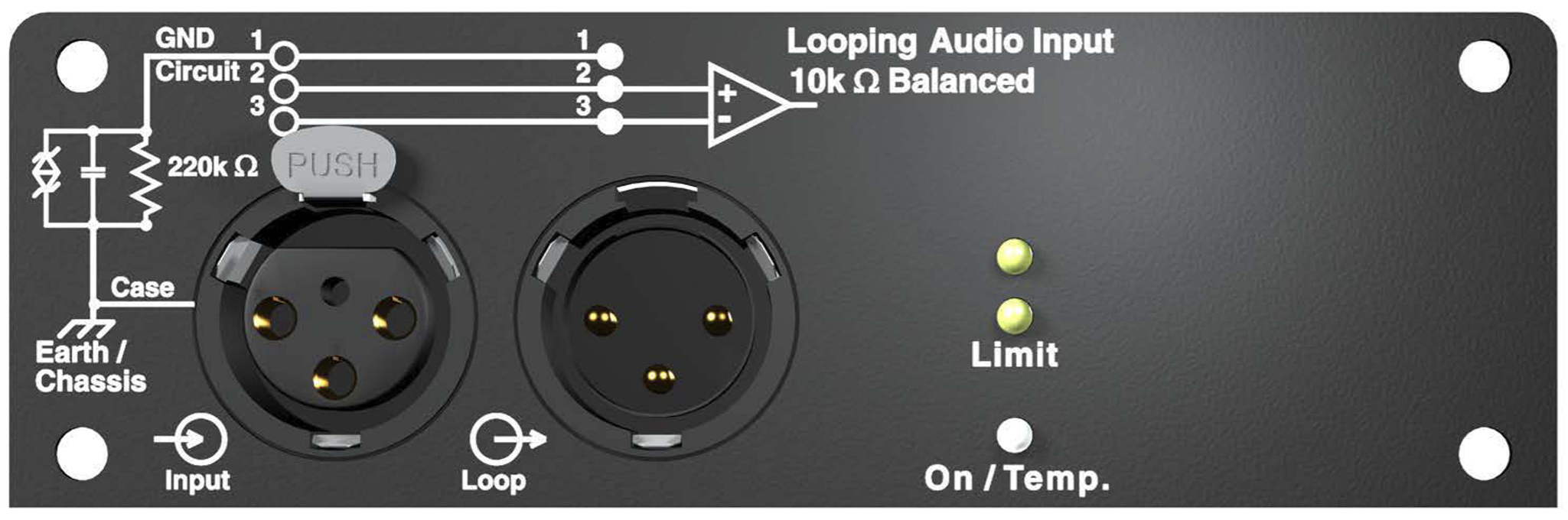 |
Figure 4: Looping Audio Input Module
Loop Connector
The male XLR Loop connector allows multiple JM-1P loudspeakers to be looped from a single audio source. Connect the Loop output of the first loudspeaker to the Input of the second, and so forth. The Loop connector is wired in parallel to the Input connector and transmits the unbuffered source signal even when the loudspeaker is powered off.
To avoid distortion when looping multiple JM-1P loudspeakers, make sure the source device can drive the total load impedance of the looped loudspeakers. In addition, the source device must be capable of delivering 20 dBV (10 V rms into 600 ohms) to yield the maximum peak SPL over the operating bandwidth of the loudspeaker.
To calculate the load impedance for the looped loudspeakers, divide 10 kOhms (the input impedance for a single JM-1P) by the number of looped loudspeakers. For example, the load impedance for 10 JM-1P loudspeakers is 1000 ohms (10 kOhms / 10). To drive this number of looped loudspeakers, the source device should have an output impedance of 100 ohms or less. This same rule applies when looping JM-1P loudspeakers with other self-powered Meyer Sound loudspeakers and subwoofers.
Note
Most source devices are capable of driving loads no smaller than 10 times their output impedance.
Make sure that all cabling for looped loudspeakers is wired correctly (Pin 1 to Pin 1, Pin 2 to Pin 2, and so forth) to prevent the polarity from being reversed. If one or more loudspeakers in a system have reversed polarity, frequency response and coverage can be significantly degraded.
Limit LEDs
The low- and high-frequency drivers for the JM-1P are powered by separate amplifier channels, each with their own limiter. Limiting activity is indicated with the two yellow Limit LEDs. The top LED indicates limiting for the high-frequency channel and the bottom LED indicates limiting for the low-frequency channel. When engaged, a channel’s limiter not only protects the driver, but also prevents signal peaks from causing excessive distortion in the amplifier’s channel, thereby preserving headroom and maintaining smooth frequency responses at high levels. When a channel’s level returns to normal, below the limiter’s threshold, limiting ceases.
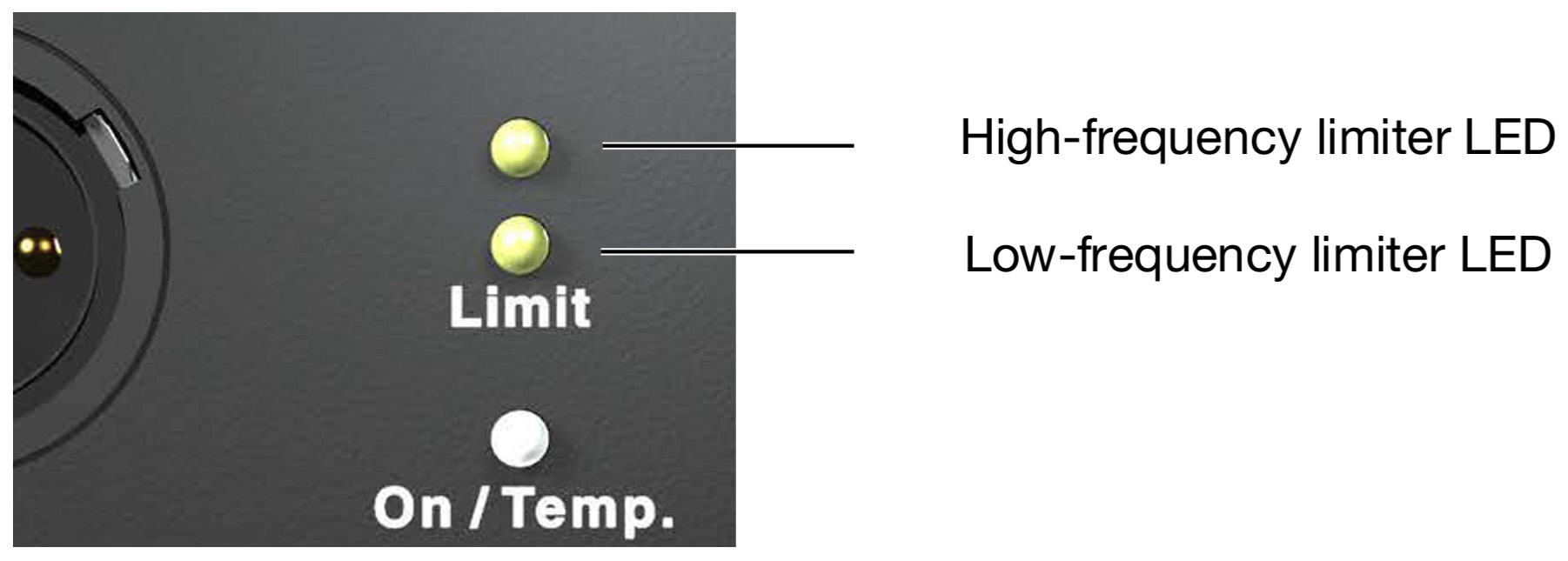 |
Figure 5: Limit LEDs
The JM-1P performs within its acoustical specifications at normal temperatures when the Limit LEDs are unlit, or if the LEDs are lit for two seconds or less and then turn off for at least one second. If an LED remains lit for longer than three seconds, that channel enters hard limiting where:
Increases to the input level have no effect.
Distortion increases due to clipping and nonlinear driver operation.
The driver is subjected to excessive heat and excursion, which will compromise its life span and may eventually lead to damage over time.
Caution
The Limit LEDs indicate when a safe, optimum level is exceeded. If a JM-1P loudspeaker begins to limit before reaching the required SPL, consider adding more loudspeakers to the system.
Note
The JM-1P loudspeaker uses optical limiters that add no noise and have no effect on the signal when the limiters are not engaged and the Limit LEDs are not lit.
On/Temp LED
When the JM-1P is powered on, its On/Temp LED turns green. If the temperature of the heat sink reaches 85° C (185° F), the On/Temp LED changes from green to red and the limiter threshold is lowered to a safe level to prevent the system from overheating. Under high temperature conditions the output level is reduced by approximately 6 dB.
When the heat sink temperature decreases to 80° C (176° F), the On/Temp LED changes from red back to green and the limiter threshold returns to normal.
Note
When the On/Temp LED is red, this is an indication that the unit is reaching its maximum dissipation and a reduction in SPL is recommended.
Tip
When the JM-1P is connected to an RMS network, the RMS software provides additional feedback on the loudspeaker’s operating temperature. For more information, see “RMS Remote Monitoring System” on pa
Amplifier Cooling System
The amplifier for JM-1P uses natural convection for cooling at low to moderate audio levels; for high audio levels, it uses Meyer Sound’s proprietary QuietCool fan technology to prevent overheating. The QuietCool™ fan only engages at high audio levels, making it virtually inaudible.
Caution
The heat sink for the JM-1P can reach temperatures of up to 85° C (185° F) during extreme operation. Use extreme caution when approaching the rear of the loudspeaker.
To keep the JM-1P from getting too hot, allow for proper ventilation around the loudspeaker, especially when it is operated in tightly packed conditions.
In the unlikely event that the heat sink temperature for the JM-1P reaches 95° C (203° F), the loudspeaker will automatically shut down until AC power is removed to allow the heat sink to cool. If after cooling and reapplying AC power the loudspeaker shuts down again, contact Meyer Sound for repair information.
Adding Subwoofers to a JM-1P Loudspeaker System
700-HP subwoofers can be added to JM-1P loudspeaker systems to enhance the low-frequency response and increase the overall acoustic power of the system in the lowest frequencies. The ideal ratio of JM-1P loudspeakers to 700-HP subwoofers depends on the frequency content of the source material and headroom required for low frequencies.
Subwoofer | Frequency Response | Recommended Ratio (Number of JM-1Ps per Subwoofer) |
|---|---|---|
700-HP | 30 Hz – 125 Hz ±4 dB | 2 x 1 for normal applications 3 x 2 for bass-heavy applications requiring additional low-frequency headroom |
700-HPs can be added to JM-1P systems by daisy-chaining them to JM-1P loudspeakers. Full-range signals can be connected directly to Meyer Sound self-powered loudspeakers because the loudspeakers have built-in active crossovers. In more complex systems, subwoofers should be integrated using line drivers or digital signal processor to send multiple outputs to each sub-system. In addition, you can use low-cut filters to flatten the overall frequency response of the system while increasing the JM-1P headroom in the lower frequencies.
Note
When JM-1P loudspeakers and 700-HP subwoofers are daisy-chained using the JM-1P’s Loop connector, the result is a fairly flat frequency response. However, the response will show an increase in the 60 Hz – 200Hz range where the loudspeaker and subwoofer overlap at certain ratios (see the table above).
If the 700-HP exhibits limiting (its Limit LED lights) before reaching the required SPL, consider adding more subwoofers to meet the SPL requirements without exposing the drivers to excessive heat and excursion.
Tip
MAPP can be used to accurately predict the appropriate loudspeaker and subwoofer integration in systems, complete with coverage data, system delay and equalization settings, rigging information, and detailed design illustrations. For more information, see MAPP System Design Tool.
Using Digital Processors
Full-range signals can be connected directly to Meyer Sound self-powered loudspeakers because the loudspeakers have built-in active crossovers. External crossovers and digital signal processors are optional and should be used with caution as they can introduce phase shifts that cause destructive cancellations.
If a digital signal processor is used, both the JM-1P loudspeakers and subwoofer should be driven from the same processor to keep their delay times the same.
Otherwise, a phase shift between the JM-1Ps and subwoofer may be encountered. In addition, you should verify the delay time between channels: some digital signal processors may incur channel-to-channel delays when the processor is near maximum throughput, which becomes more likely as the number of filters in use by the processor is increased.
Third-order filters (and higher) are not recommended. If they must be used, they should be used cautiously, since they may cause phase shifts that deteriorate the impulse response; in addition, their higher roll-off may also interfere with crossover interaction.
Tip
To address the collective concerns of system design verification, subwoofer integration, digital signal processors, delay systems, and acoustical conditions, a measurement system such as Meyer Sound’s SIM is strongly recommended.
The JM-1P loudspeaker is compatible with Meyer Sound’s QuickFly system, a comprehensive collection of custom-designed rigging, flying, and mounting options. Comprised of rugged, reliable, and easy-to-configure components, QuickFly lets you deploy JM-1P loudspeakers as arrays at precise angles to take full advantage of their directional components. The top and bottom plates for the JM-1P cabinets are constructed of heavy-duty, high-strength, corrosion-resistant 6061-T6 aluminum and include threaded metric holes (for M10 screws) for easy connection to QuickFly rigging and third-party mounting options.
QuickFly Rigging
The JM-1P loudspeaker is compatible with Meyer Sound’s QuickFly system, a comprehensive collection of custom-designed rigging, flying, and mounting options. Comprised of rugged, reliable, and easy-to-configure components, QuickFly lets you deploy JM-1P loudspeakers as arrays at precise angles to take full advantage of their directional components. The top and bottom plates for the JM-1P cabinets are constructed of heavy-duty, high-strength, corrosion-resistant 6061-T6 aluminum and include threaded metric holes (for M10 screws) for easy connection to QuickFly rigging and third-party mounting options.
JM-1P GuideALinks
The JM-1P is equipped with GuideALinks on its four right corners that attach to an adjacent JM-1P with the links inserted in the left corner slots of the linked unit. GuideALinks are extended and retracted with front and rear knobs. The links are secured to the linked JM-1P with the quick-release pins included with each loudspeaker. GuideALinks are also used when flying JM-1Ps from the MTG-JM1 vertical grid.
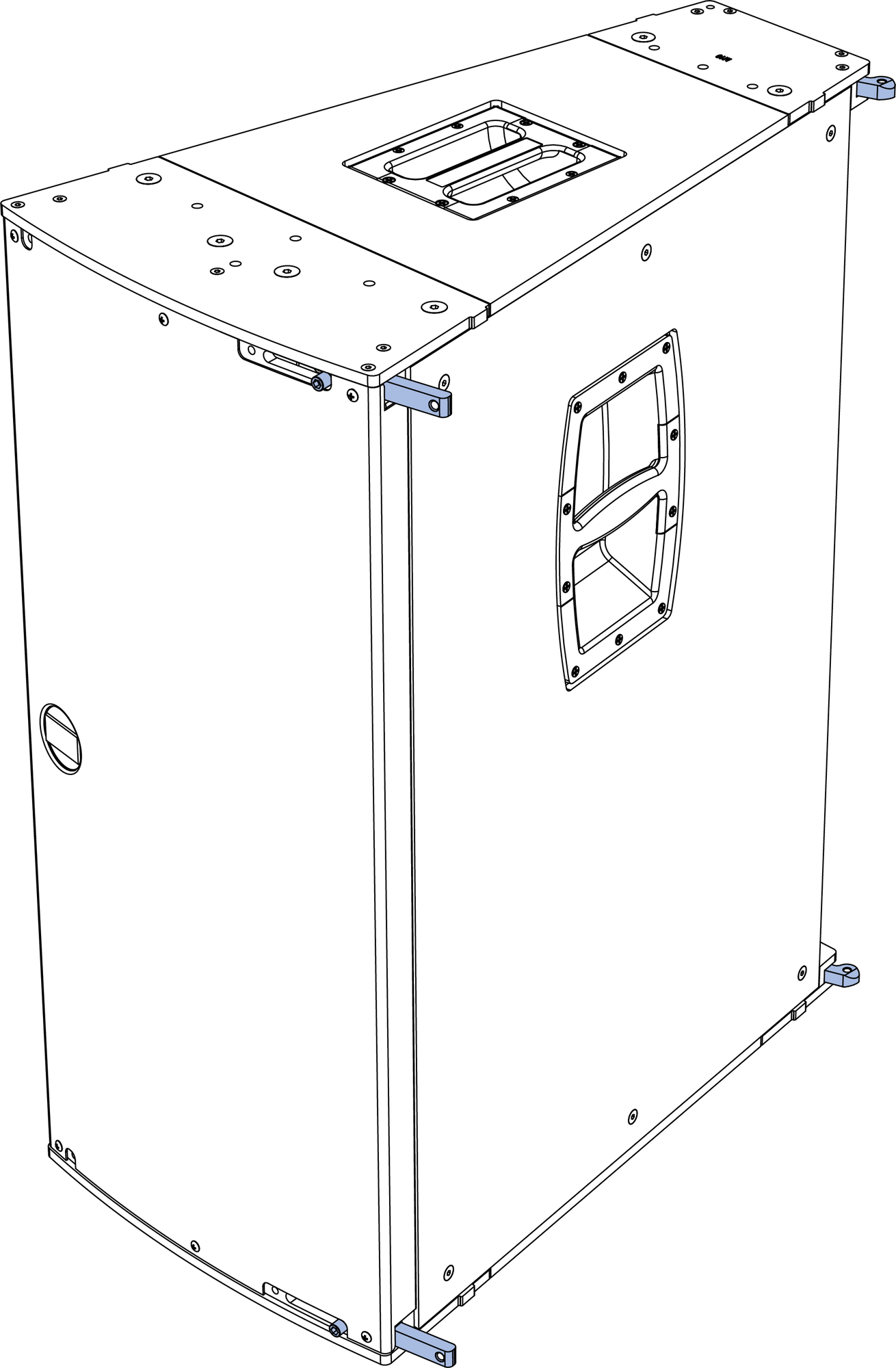 |
Figure 6: JM-1P GuideALinks
Caution
When moving and linking JM-1Ps, avoid placing fingers between the units to prevent injury.
JM-1P Quick-Release Pins
Each JM-1P ships with four quick-release pins that secure the units when they are linked. When inserting and removing the pins, press the button at the top of the pin to disengage it. When inserted in the GuideALink holes (in the front left corners and rear right corners), the pins latch and lock to the links inserted into the corner slots.
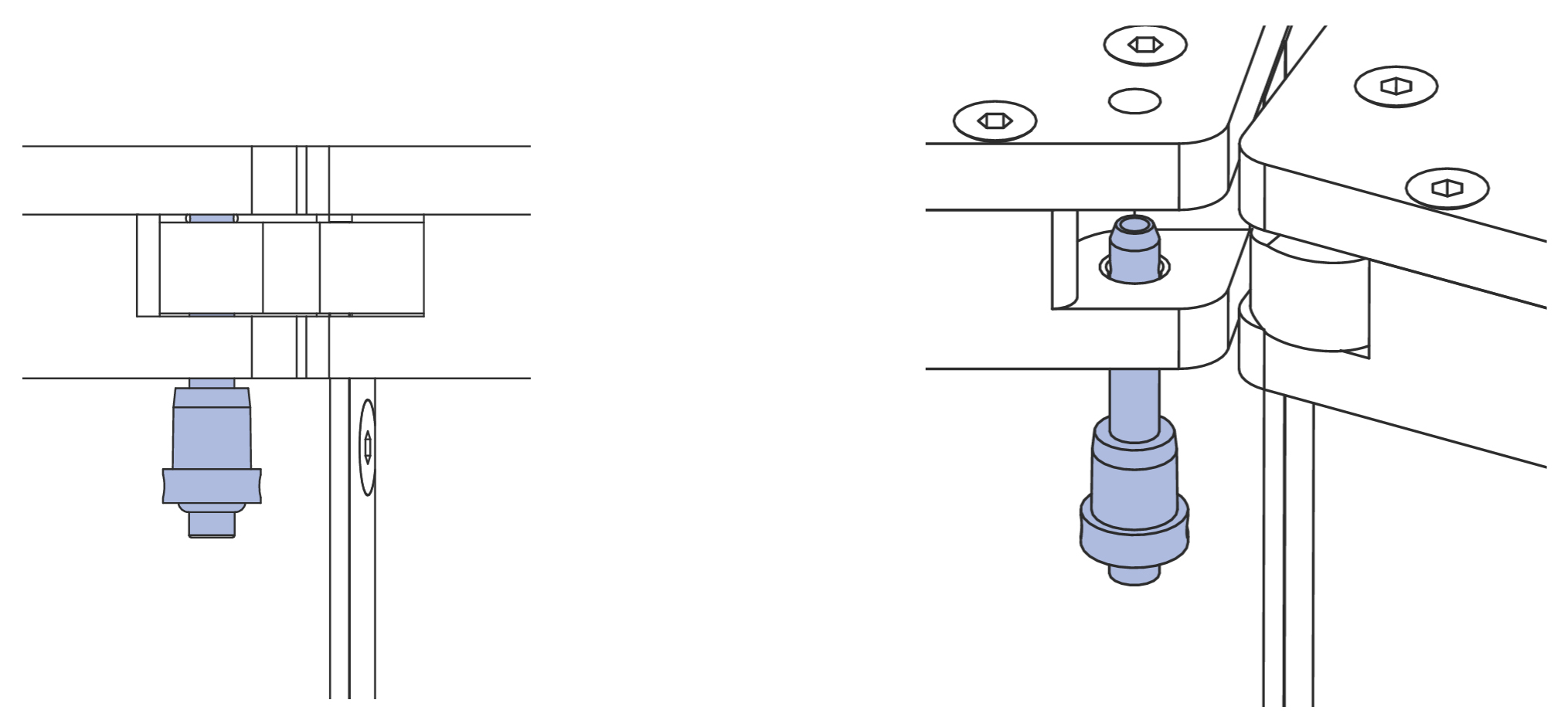 |
Figure 7: Rear Quick-Release Pin, GuideALink Inserted (Left); GuideALink Not Present (Right)
When the GuideALinks are not present in the corner slots, the quick-release pins should be removed from the corner link holes and placed in their stowed location: in the front, just to the left of the top and bottom GuideALink knobs; and in the rear, in the top and bottom center holes.
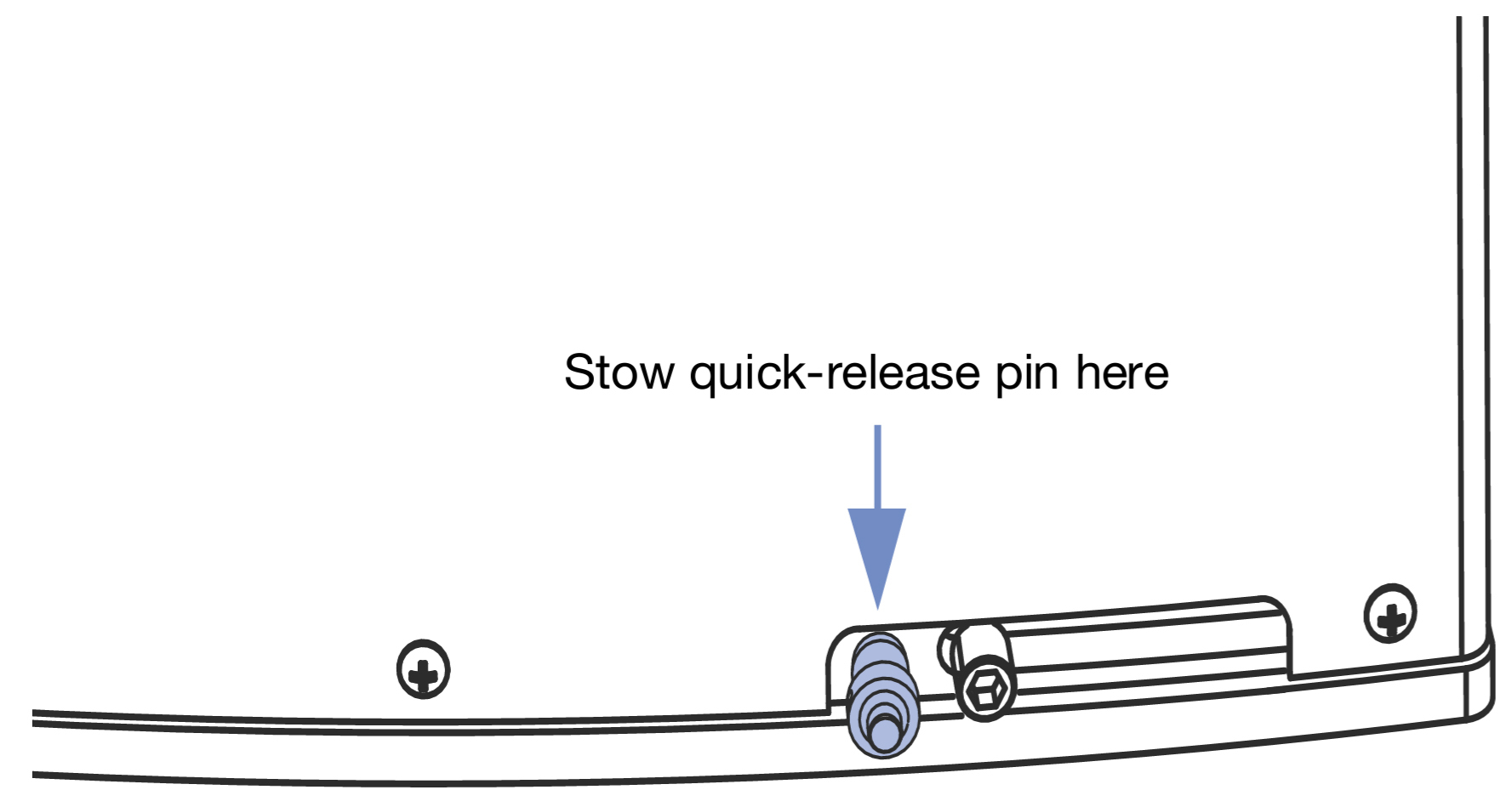 |
Figure 8: Stowed Quick-Release Pin, Front Bottom
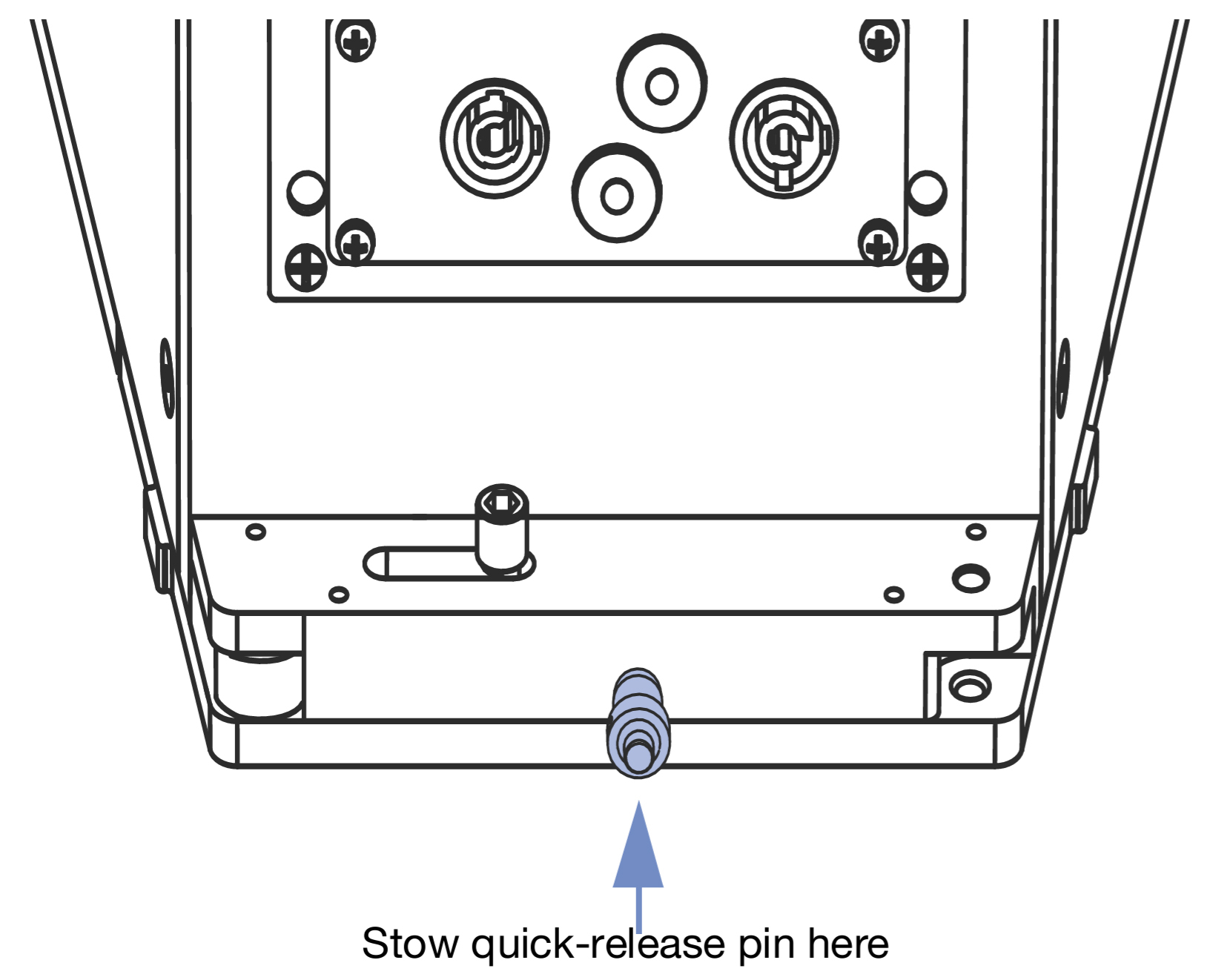 |
Figure 9: Stowed Quick-Release Pin, Rear Bottom
Linking JM-1Ps
Place the JM-1Ps next to each other on a flat surface and align the adjacent back corners so they are as close as possible to each other.\
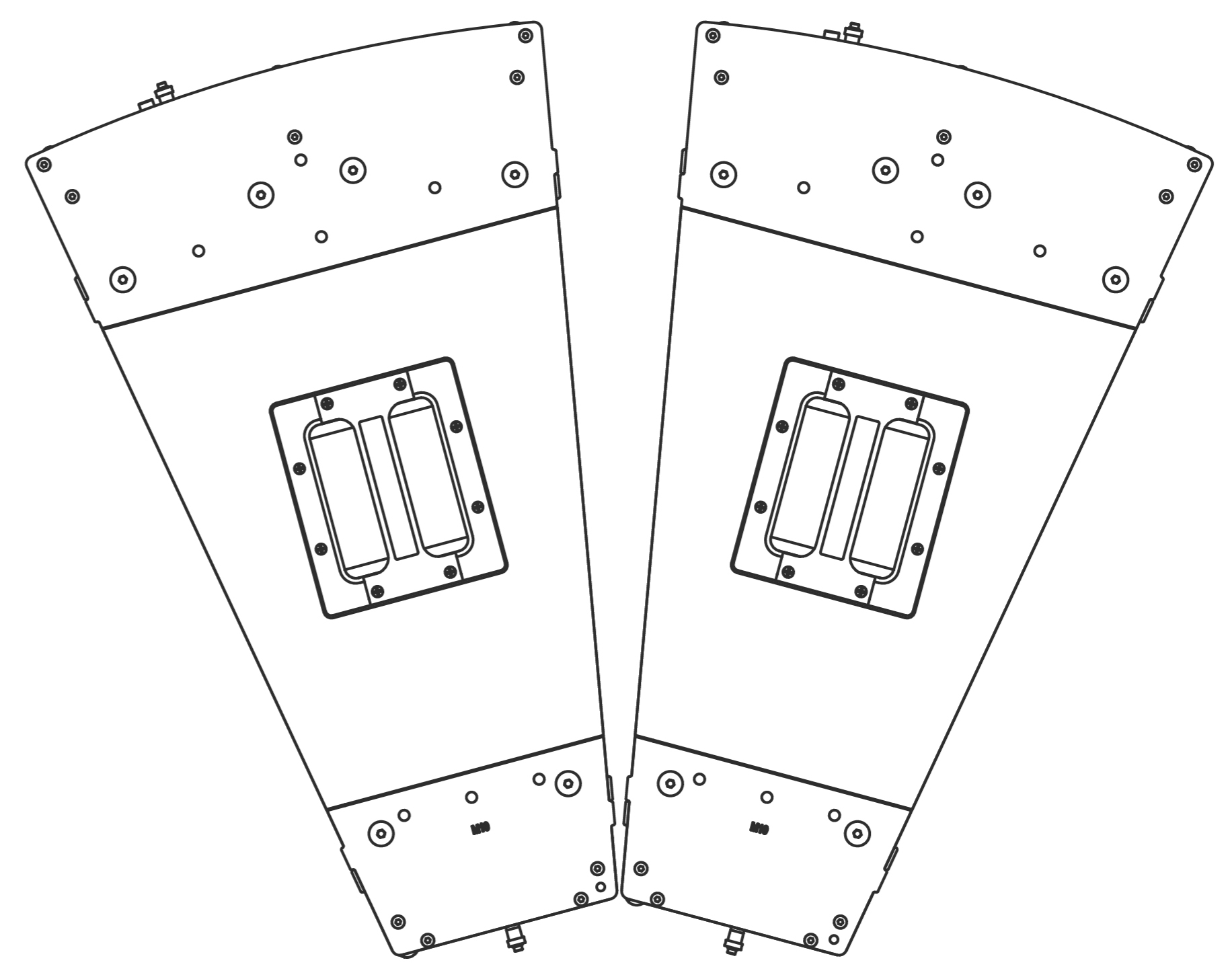
Figure 10: Linking JM-1P Loudspeakers
Face the rear of the loudspeakers and slide the top and bottom rear GuideALink knobs to the left to insert the links into the corner slots of the adjacent loudspeaker.
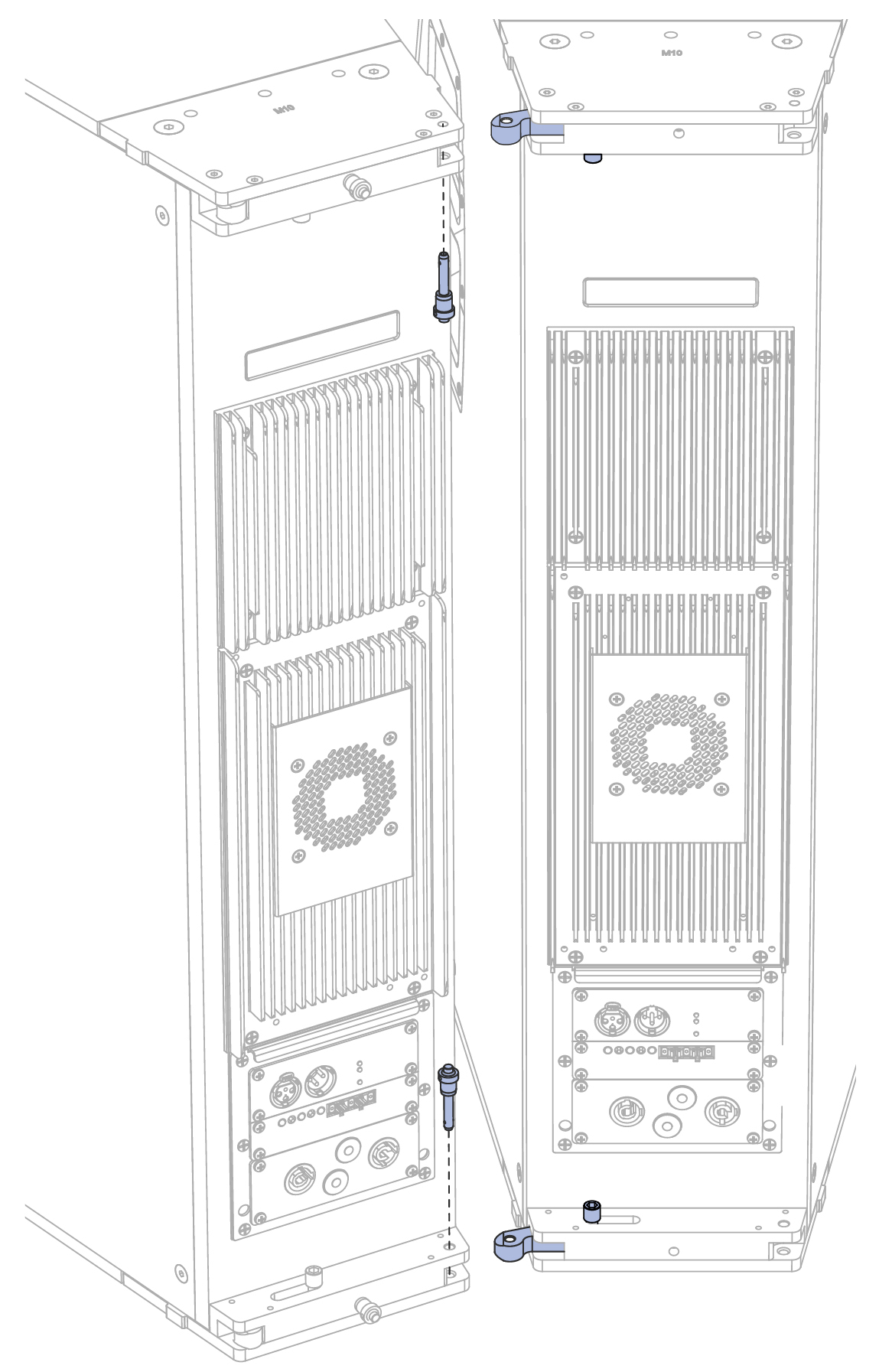
Figure 11: Inserting Rear GuideALinks
Secure the rear GuideALinks with the quick-release pins stored at the center top and center bottom of the loudspeaker. The pins can be inserted top down or bottom up.
Face the front of the loudspeakers and position the loudspeakers so their adjacent front corners are as close as possible to each other. The previously attached rear GuideALinks act as a hinge.
Slide the top and bottom front GuideALink knobs to the right to insert the links into the corner slots of the adjacent loudspeaker.
Secure the front GuideALinks with the quick-release pins stored at the right top and right bottom of the loudspeaker. The pins are inserted from the front, as shown in the figure below.
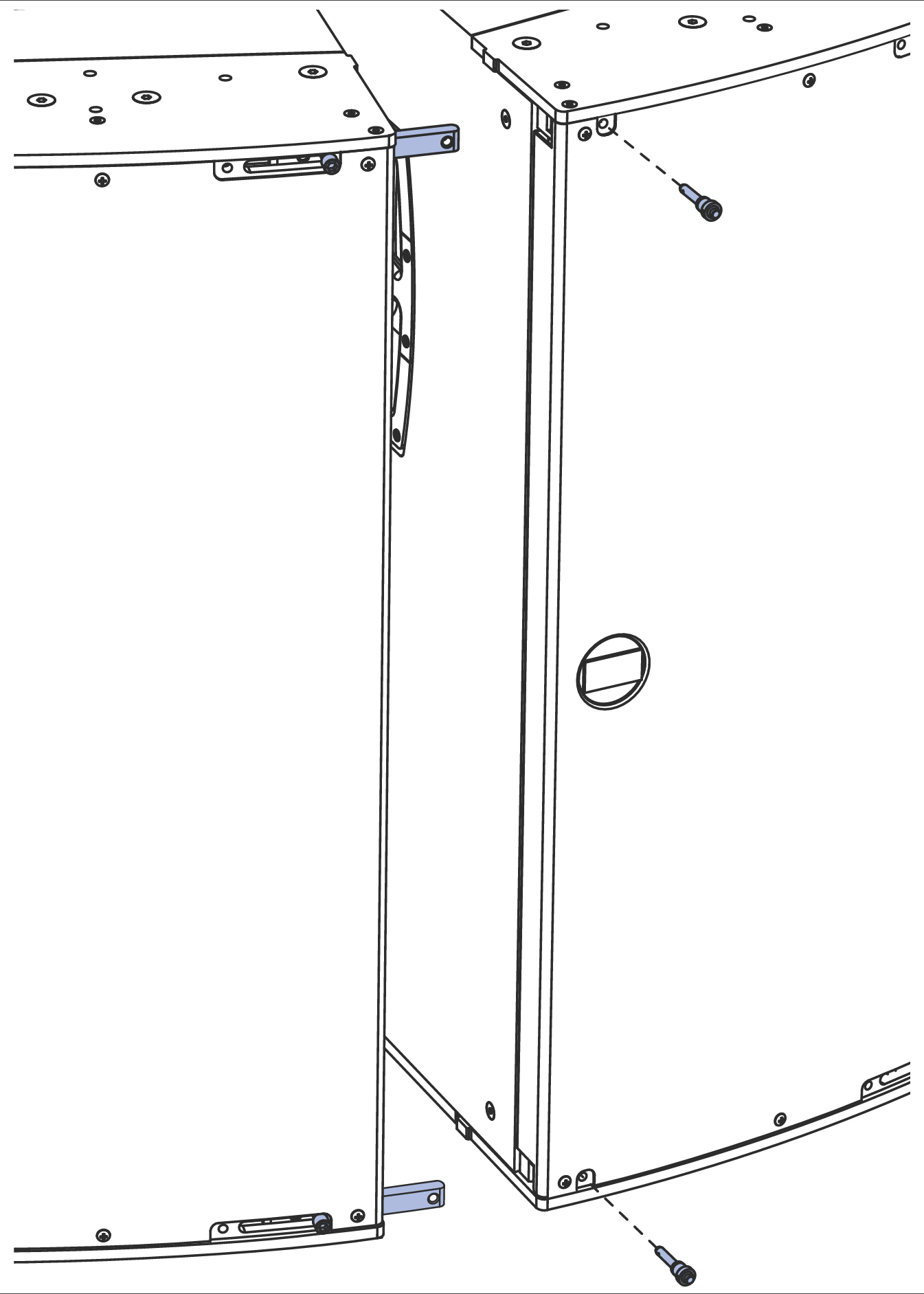
Figure 12: Inserting Front GuideAlinks
Caution
Routine maintenance inspections of the JM-1P should include a check of all GuideALink knobs. Rotate each knob counterclockwise to make sure they are tight. If a knob turns, reset it in the link with Loctite® 290 and let it cure for 48 hours. Retest the link before the unit is flown.
MPA-JM1 Pickup Plate
The optional MPA-JM1 pickup plate suspends JM-1P horizontal arrays with uptilt or downtilt. A single pickup plate supports 1–4 loudspeakers. Two pickup plates support 5–6 loudspeakers. The pickup plate comes with M10 knobs, bolts, and washers for securing the plate to the JM-1P. Bolts are recommended for fixed installations, while knobs are recommended for touring and portable applications.
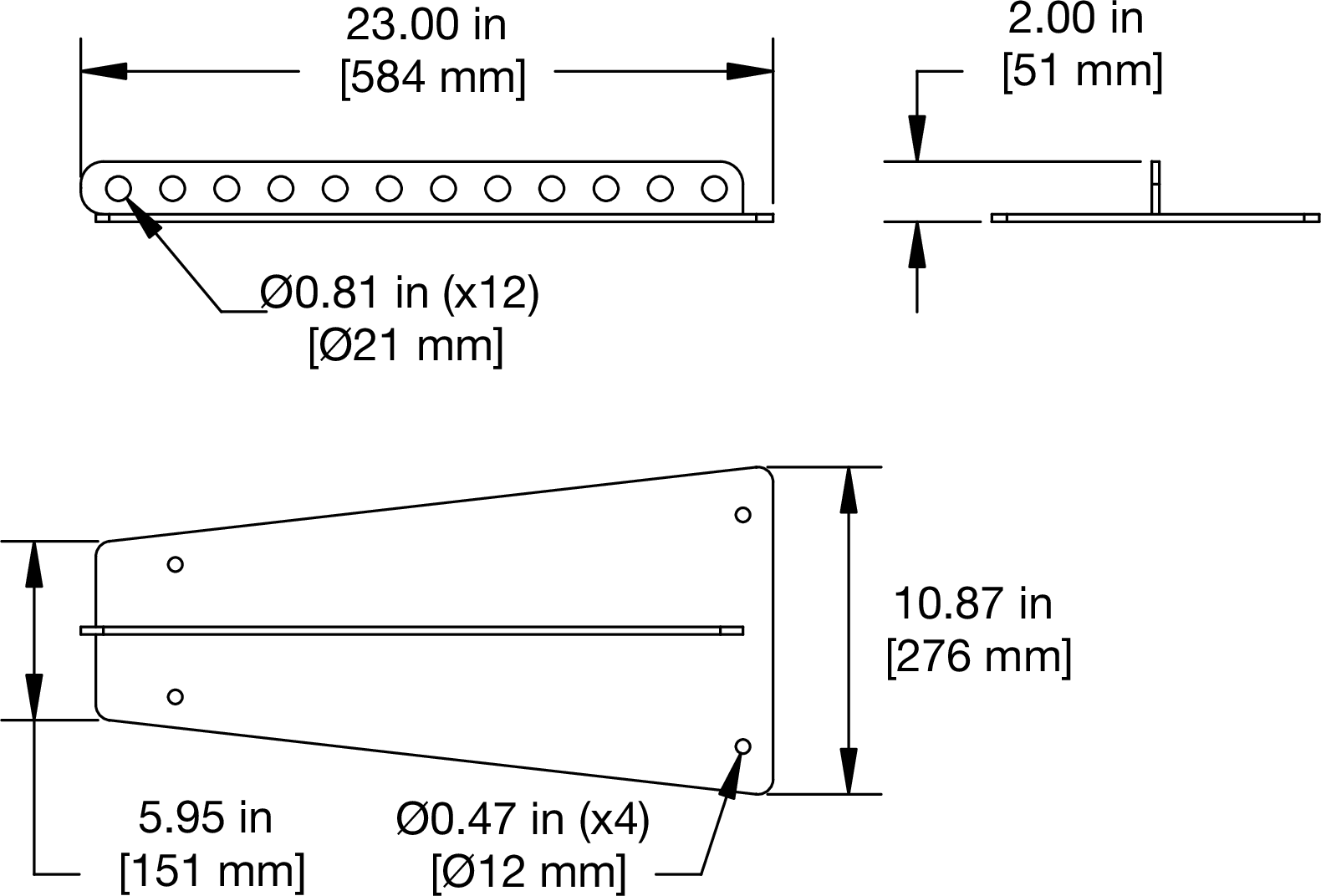 |
Figure 13: MPA-JM1 Pickup Plate Dimensions; Weight, 16 lbs (7.26 kg)
The MPA-JM1 has a row of 12 hanging points in the center of the plate. When suspending the pickup plate from a single hanging point, the location of the hanging point determines the uptilt or downtilt of the suspended JM-1P. For greater control, two or more hanging points can be used.
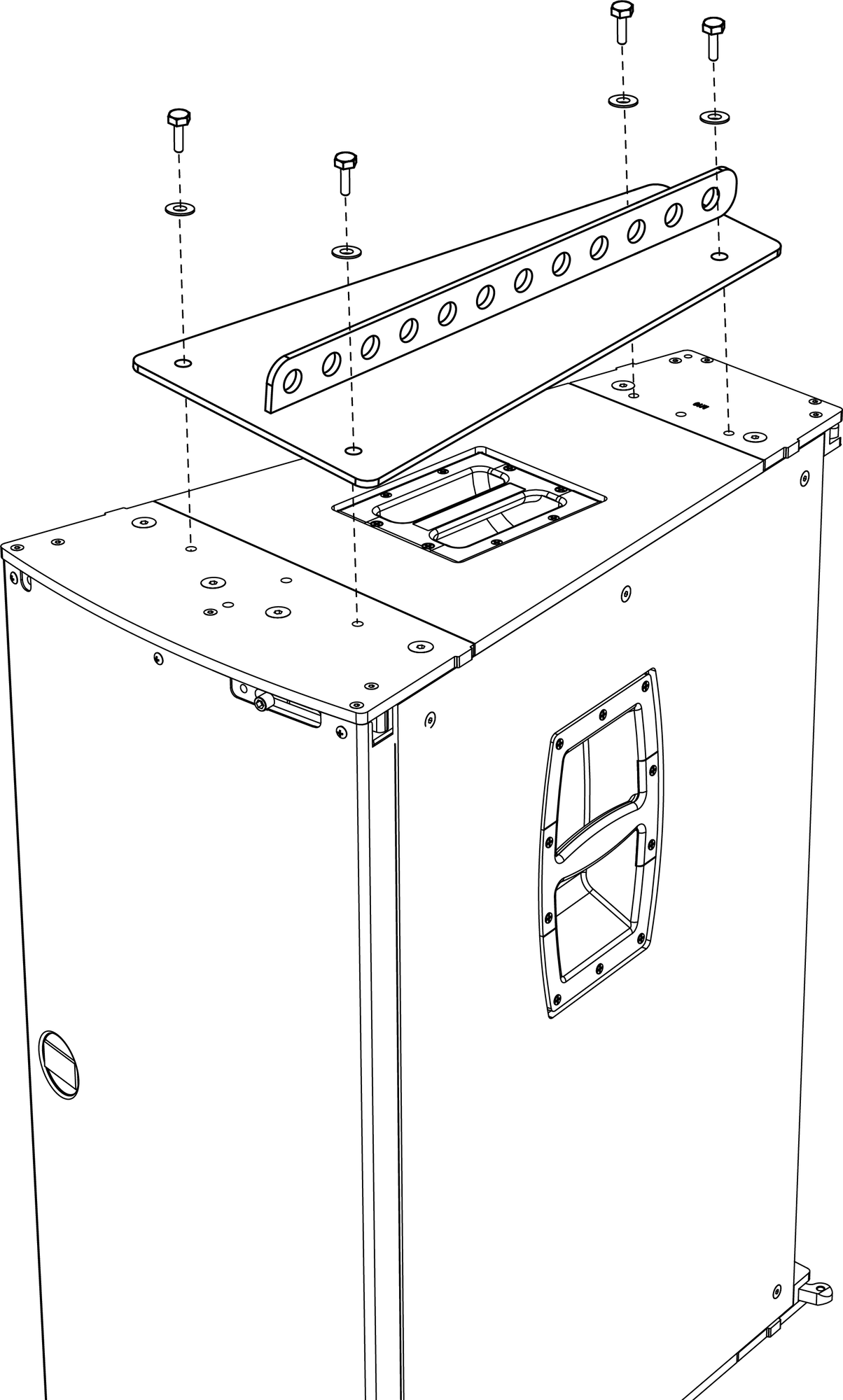 |
Figure 14: MPA-JM1 Pickup Plate with JM-1P
Note
When using M10 knobs to secure the MPA-JM1 pickup plate to the JM-1P, the second hanging point from the rear is inaccessible.
JM-1P Arrays with a Single Pickup Plate
A single MPA-JM1P pickup plate can suspend arrays of 2–4 loudspeakers:
For arrays of two JM-1Ps (with 40 degrees of horizontal coverage), attach the single pickup plate between the two loudspeakers.
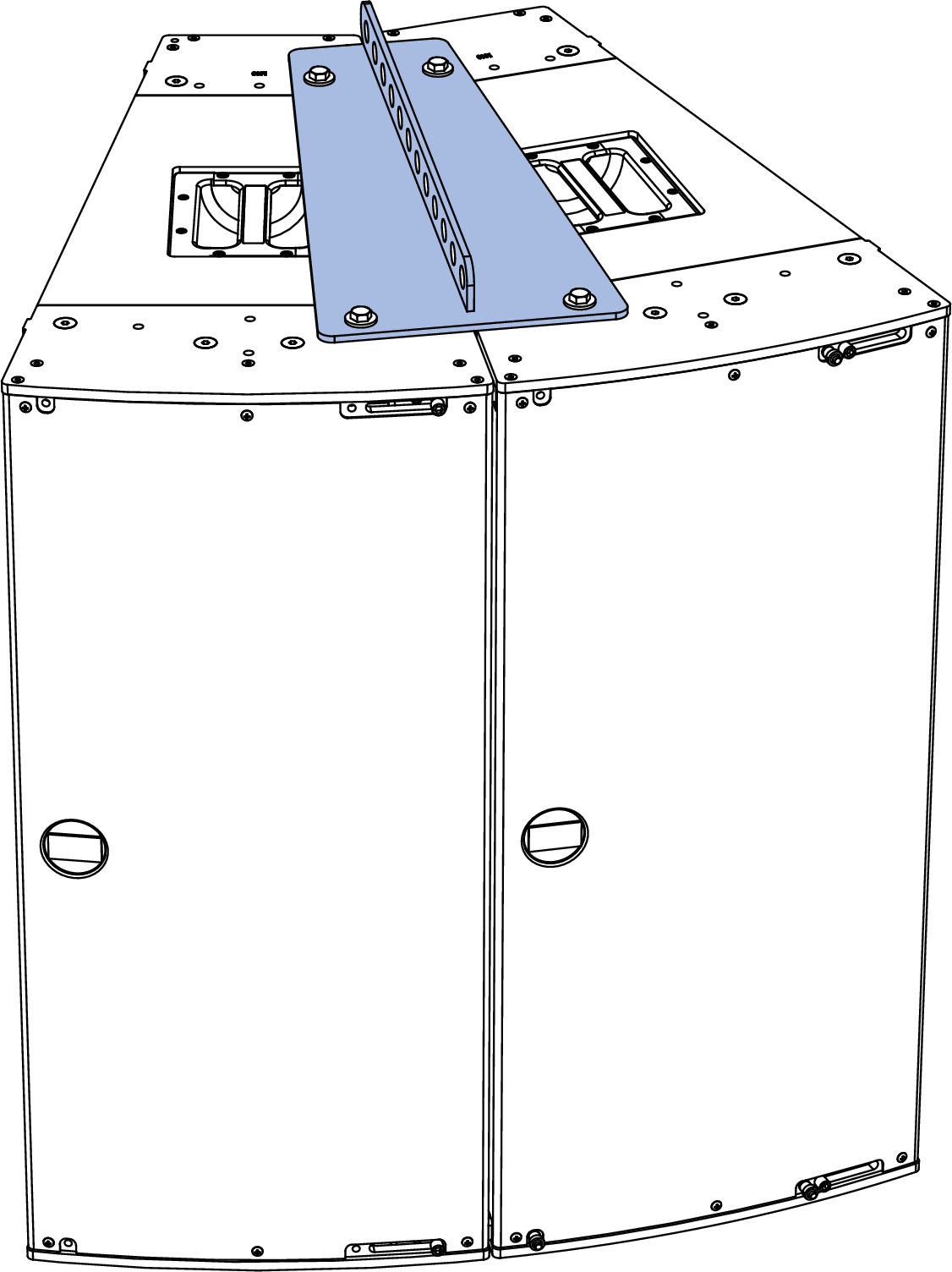
Figure 15: MPA-JM1 Pickup Plate with Two JM-1Ps
For arrays of three JM-1Ps (with 60 degrees of horizontal coverage), attach the single pickup plate to the second loudspeaker.
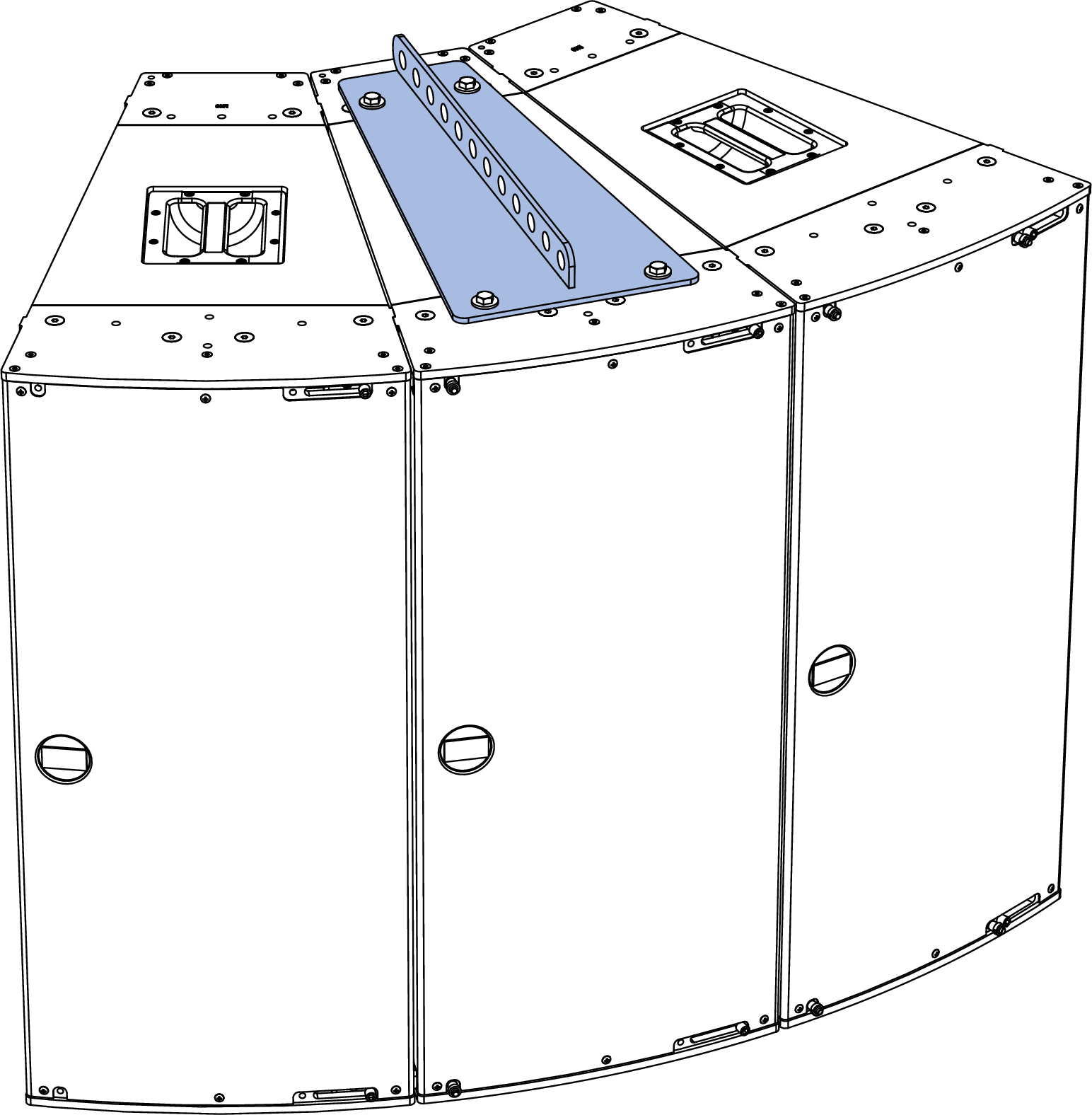
Figure 16: MPA-JM1 Pickup Plate with Three JM-1Ps
For arrays of four JM-1Ps (with 80 degrees of horizontal coverage), attach the single pickup plate between the third and fourth loudspeaker.
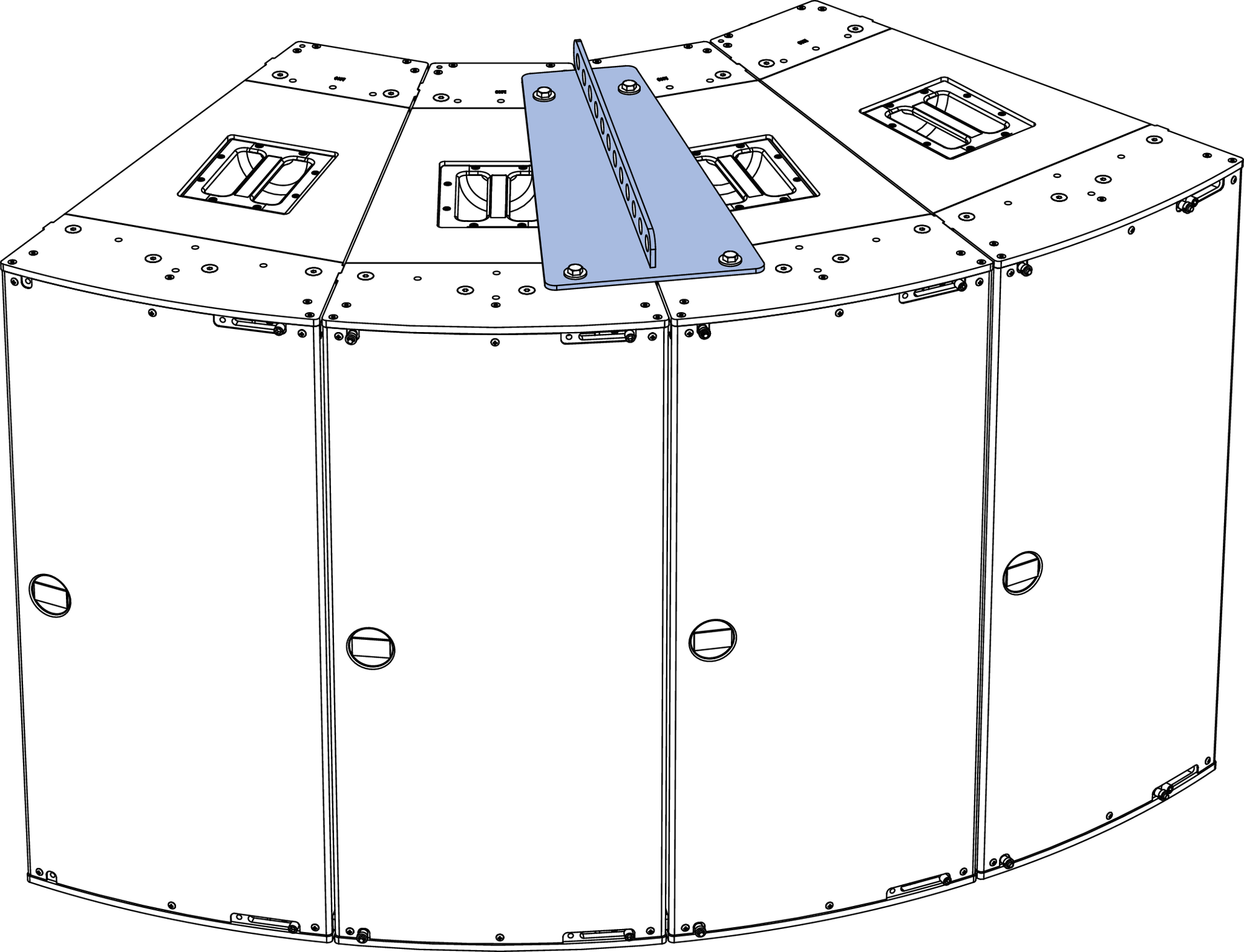
Figure 17: MPA-JM1 Pickup Plate with Four JM-1Ps
JM-1P Arrays with Two Pickup Plates
Two MPA-JM1 pickup plates can suspend arrays of 4–6 loudspeakers:
For arrays of four JM-1Ps (with 80 degrees of horizontal coverage), attach the two pickup plates between the first and second, and third and fourth loudspeakers.
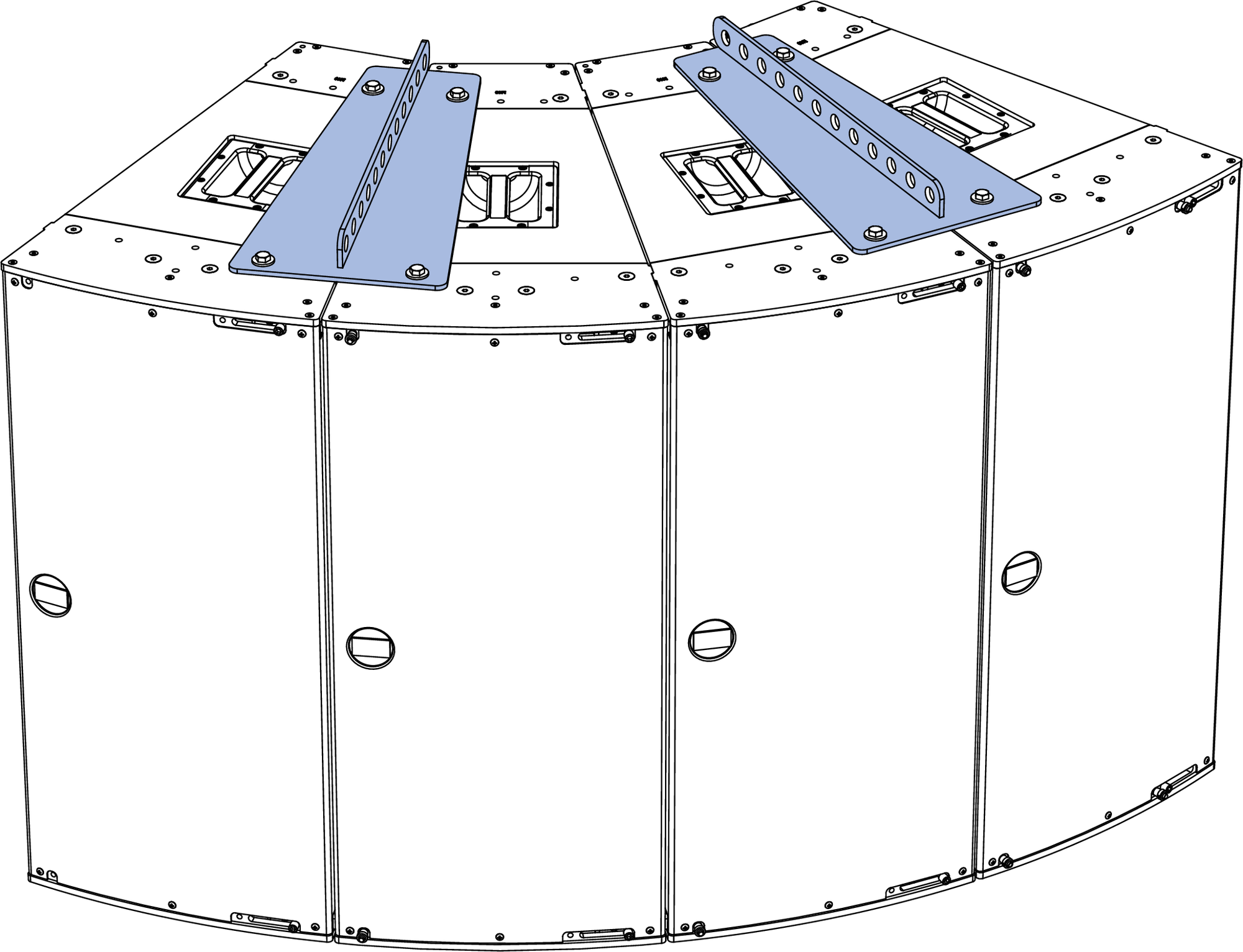
Figure 18: Two MPA-JM1 Pickup Plates with Four JM-1Ps
For arrays of five JM-1Ps (with 100 degrees of horizontal coverage), attach the two pickup plates to the second and fourth loudspeakers.
For arrays of six JM-1Ps (with 120 degrees of horizontal coverage), attach the two pickup plates to the second and fifth loudspeakers.
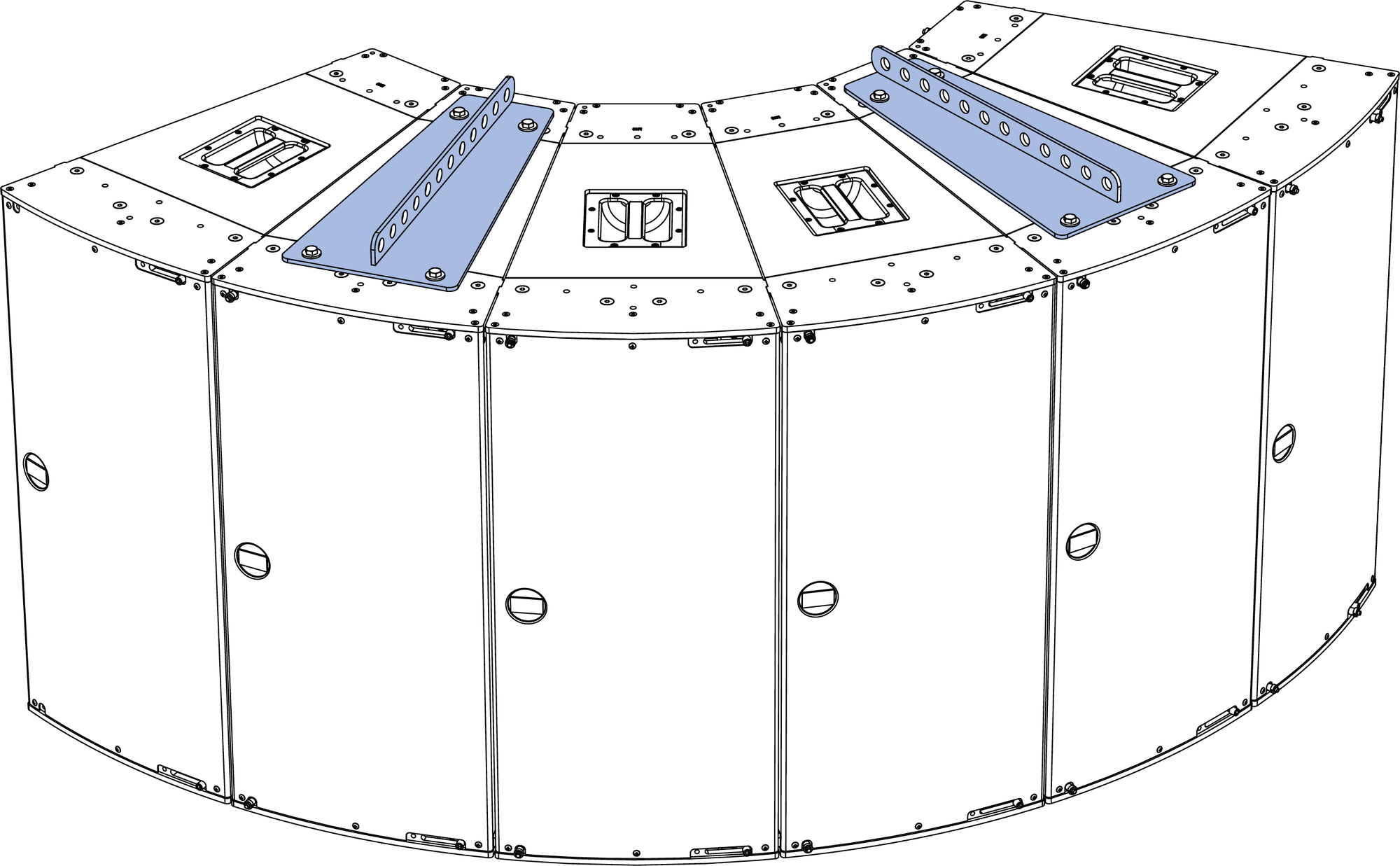
Figure 20: Two MPA-JM1 Pickup Plates with Six JM-1Ps
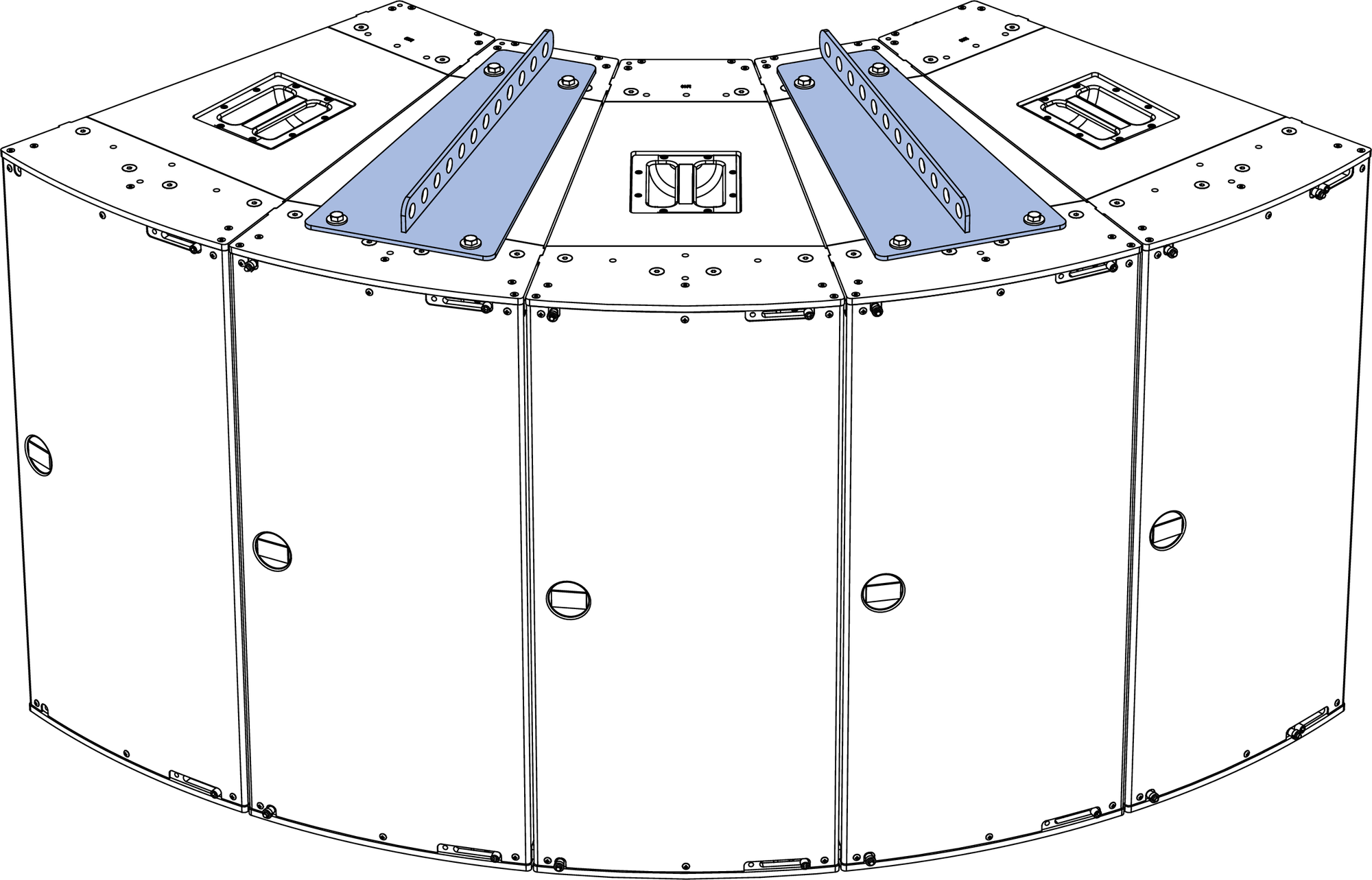

MTGSB-4B Spreader Bar
The optional MTGSB-4B spreader bar can suspend two MPA-JM1P pickup plates from a single motor point. Six hanging points are provided at each end of the spreader bar to adjust the spread between the pickup plates. The MTGSB-B spreader bar includes shackles and connecting links.
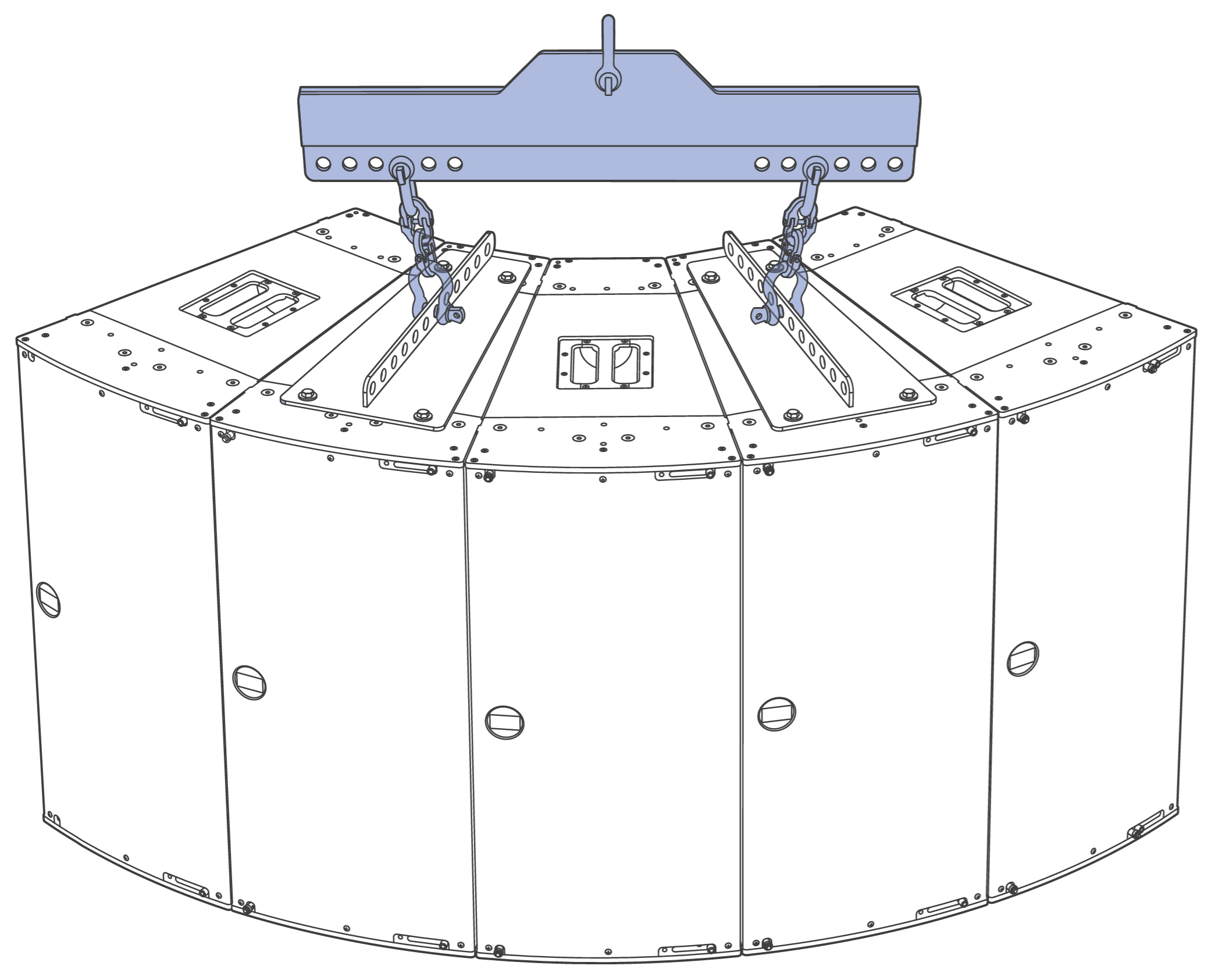 |
Figure 21: Two MPA-JM1 Pickup Plates with Five JM-1Ps Suspended from the MGTSB-4B Spreader Bar Using 3rd Spreader Bar Hole and 7th MPA-JM1 Pickup Plate Hole
Angles Achievable with MPA-JM1 Pickup Plate — Horizontal Arrays
The uptilt and downtilt angles achievable with the JM-1P are determined by the number of pickup points, the MPA-JM1 pickup hole(s) used and the vertical orientation of the loudspeaker (horn on top or “up” versus horn on bottom or “down”— see the figure below). These angles differ also depending on the number of loudspeakers suspended and the number of MPA-JM1 pickup plates required to suspend them. Table Resulting Angles using Single Pickup Point, below, provides a list of resulting angles using a single pickup point. Table Resulting Angles using Two Pickup Points, provides a list of resulting angles using two pickup points. Table Using the Spreader Bar and a Single Pickup Point, provides a list of resulting angles using the MGTSB-4B Spreader Bar and a single pickup point.
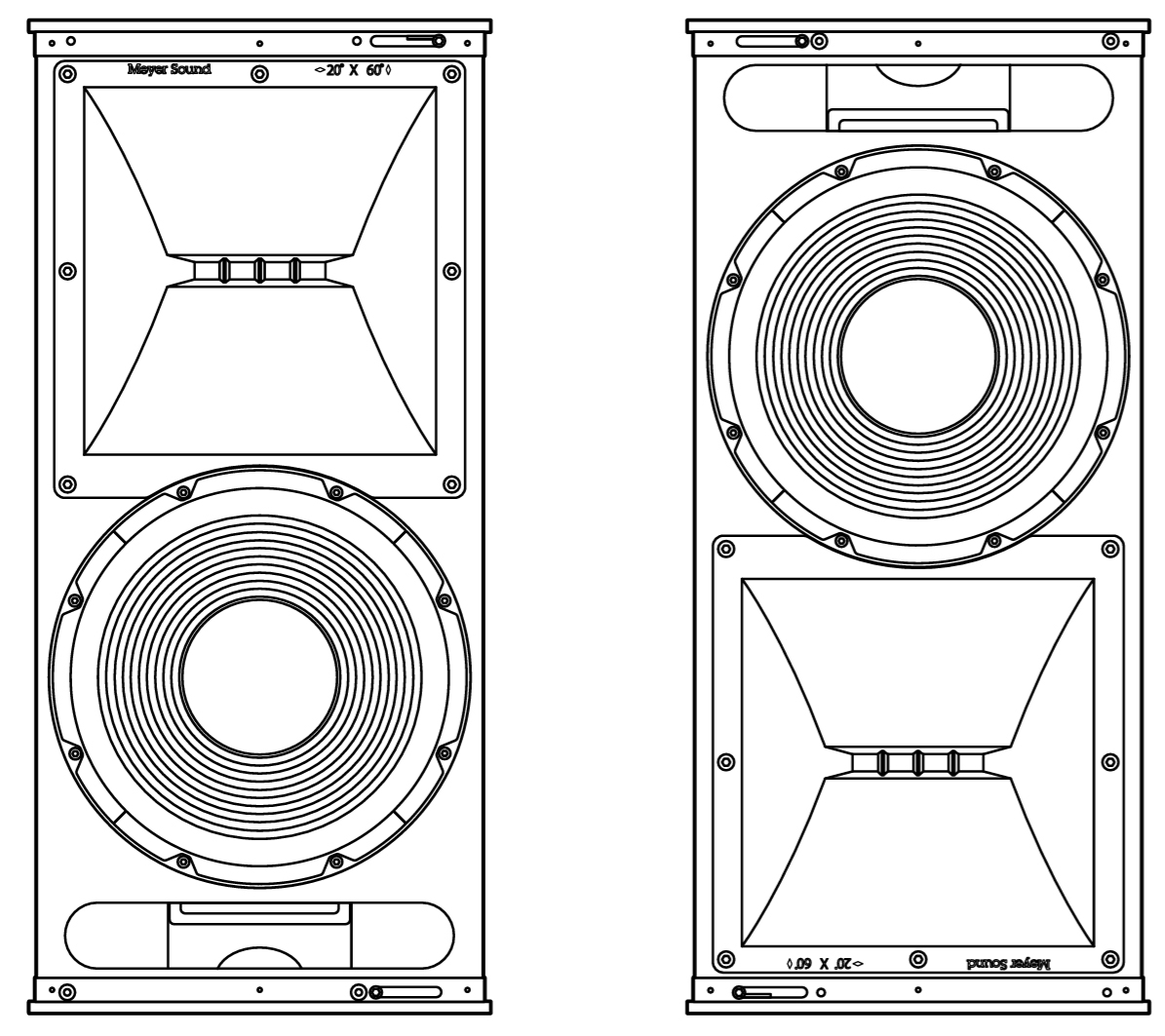 |
Figure 22: Horn Up (left), Horn Down (right)
Horn Orientation | Number of JM-1P | Number of MPA-JM1 | Reference | MPA-JM1 Pickup Plate Hole (counting from front of loudspeaker cabinet) | |||||||||||
|---|---|---|---|---|---|---|---|---|---|---|---|---|---|---|---|
1 | 2 | 3 | 4 | 5 | 6 | 7 | 8 | 9 | 10 | 11 | 12 | ||||
Up | 1 | 1 | 24.1 | 19.0 | 13.3 | 7.8 | 1.8 | -4.2 | -10.0 | -15.4 | -21.0 | -26.0 | -30.5 | -34.7 | |
Down | 1 | 1 | 24.0 | 19.1 | 13.7 | 8.2 | 2.1 | -3.8 | -9.7 | -15.4 | -20.8 | -25.8 | -30.2 | -34.8 | |
Up | 2 | 1 | 24.5 | 19.5 | 14.7 | 9.2 | 3.6 | -2.0 | -7.6 | -13.2 | -18.4 | -23.4 | -27.8 | -32.2 | |
Down | 2 | 1 | 24.7 | 19.7 | 14.7 | 9.2 | 3.6 | -2.0 | -7.6 | -13.4 | -18.6 | -23.6 | -28.2 | -32.5 | |
Up | 3 | 1 | 26.3 | 21.6 | 16.8 | 11.5 | 6.1 | 0.4 | -5.0 | -10.4 | -15.8 | -21.0 | -25.4 | -29.9 | |
Down | 3 | 1 | 26.4 | 21.6 | 16.8 | 11.5 | 6.3 | 0.8 | -4.9 | -10.5 | -15.6 | -20.8 | -25.5 | -29.9 | |
Up | 4 | 1 | 29.1 | 24.6 | 19.8 | 14.7 | 9.4 | 4.1 | -1.4 | -7.0 | -12.4 | -17.6 | -22.3 | -26.9 | |
Down | 4 | 1 | 28.7 | 24.6 | 19.9 | 14.9 | 9.6 | 4.2 | -1.4 | -7.0 | -12.3 | -17.6 | -22.5 | -26.9 | |
Number of JM-1P | Number of MPA-JM1 | Figure | MPA-JM1 Pickup Plate Hole (counting from front of loudspeaker) | |||||||||||
|---|---|---|---|---|---|---|---|---|---|---|---|---|---|---|
1 | 2 | 3 | 4 | 5 | 6 | 7 | 8 | 9 | 10 | 11 | 12 | |||
4 | 2 | 22.9 | 18.1 | 13.2 | 8.0 | 2.8 | -2.4 | -7.7 | -12.9 | -17.7 | -22.3 | -26.7 | -30.7 | |
5 | 2 | 26.4 | 21.8 | 17.1 | 12.4 | 7.3 | 2.2 | -3.0 | -8.2 | -12.9 | -18.0 | -22.5 | -26.3 | |
6 | 2 | The UP-4slim ultra-compact loudspeaker is ideally suited for intallation applications requiring a small, slim, aesthetically pleasing cabinet that delivers high sound pressure levels with low distortion and uniform coverage. The UP-4slim offers this exceptional audio performance in a compact, self-powered package with a remote power supply. As a standalone loudspeaker, the UP-4slim is appropriate for vocal reinforcement, front-fill, and under balcony fill applications. | 30.2 | 26.2 | 21.8 | 17.2 | 12.5 | 7.1 | 2.6 | -2.5 | -7.5 | -12.5 | -17.6 | -22.2 |
Number of JM-1P | Number of MPA-JM1 | Figure | Spreader Bar Hole (counting from inside, same on each side)/ MPA-JM1 Pickup Plate Hole (counting from front of loudspeaker) | ||
|---|---|---|---|---|---|
5 | 2 | SB Hole: 4/MPA-JM1 Hole: 1 | SB Hole: 3/MPA-JM1 Hole: 7 | SB Hole: 1/MPA-JM1 Hole: 12 | |
MTG-JM1 Vertical Grid
The optional MTG-JM1 vertical grid suspends JM-1P vertical arrays of up to six units. The grid was designed specifically for the JM-1P and is compatible with the GuideALinks and quick-release pins included with the JM-1P.
The MTG-JM1 vertical grid has a row of nine hanging points in the center of the grid. Two additional attachment points are located at the left and right rear corners of the grid to provide additional control and stability.
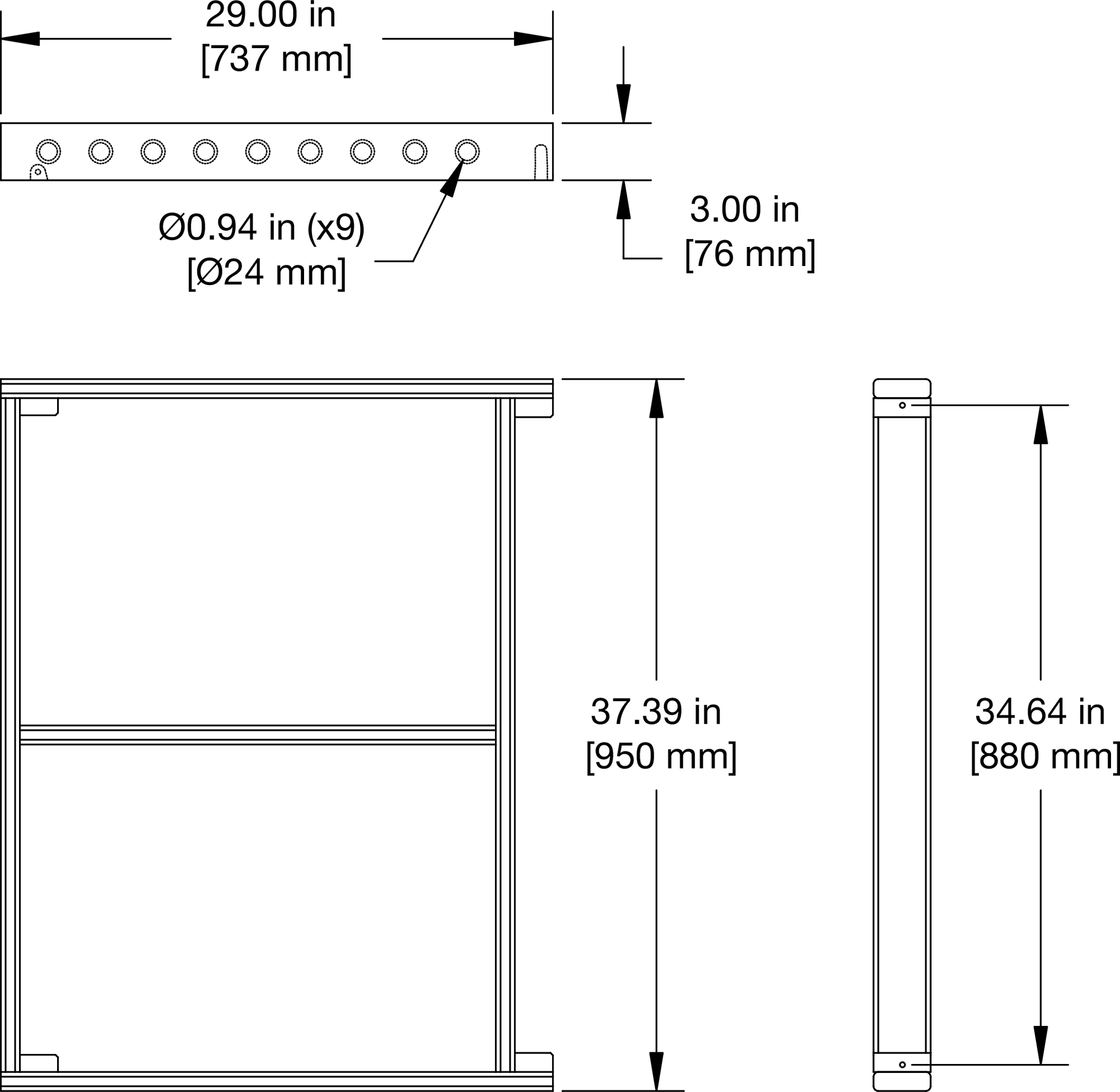 |
Figure 23: MTG-JM1 Vertical Grid Dimensions; Weight, 47 lbs (21.32 kg)
The MTG-JM1 vertical grid comes with four quick-release pins for securing the JM-1P connected directly to the grid. To secure the front GuideALinks, the quick-release pins are inserted at the front of the grid. To secure the rear GuideALinks, the pins are inserted from the inside of the grid. Additional JM-1Ps in the array are secured with the quick-release pins included with each loudspeaker.
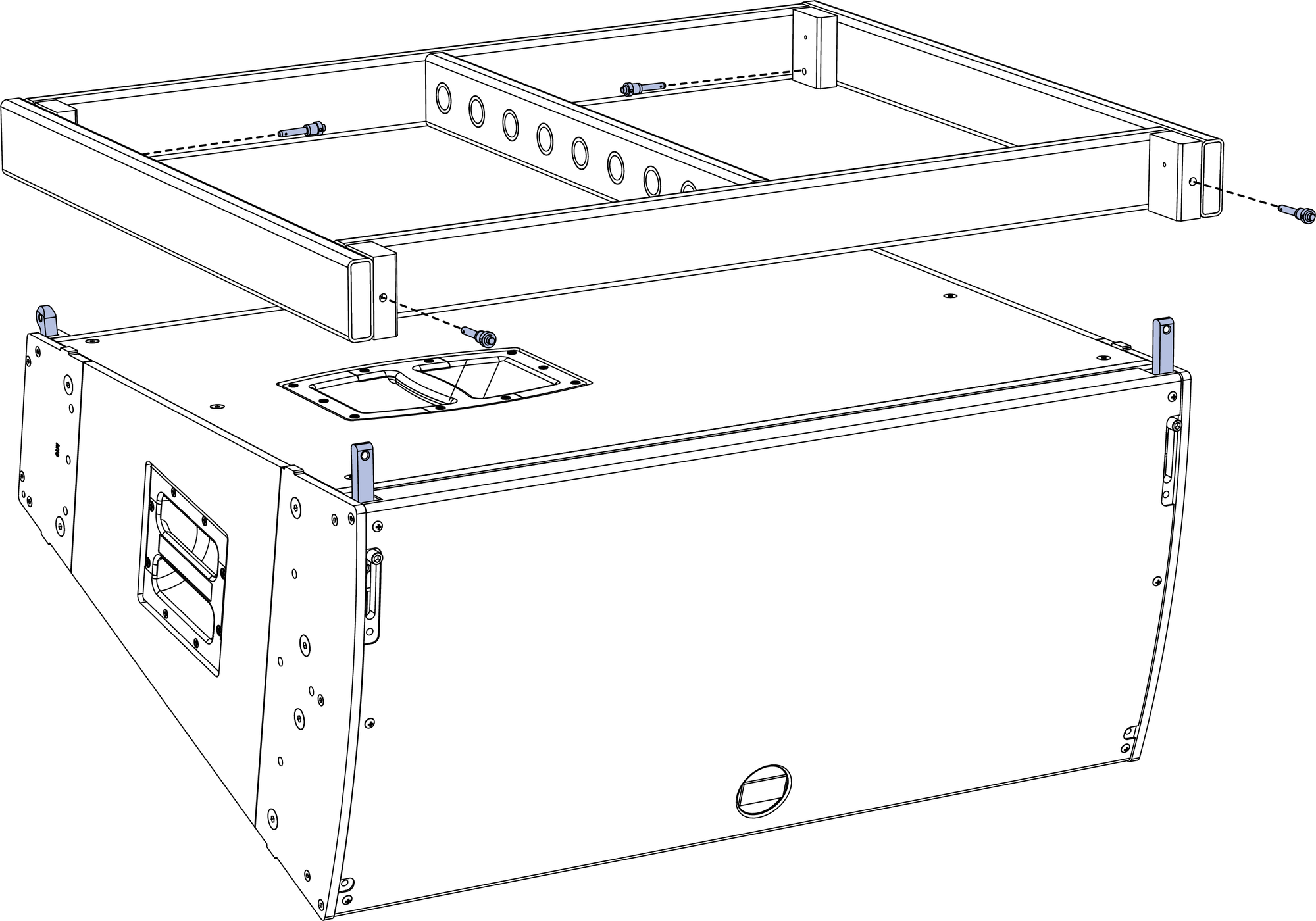 |
Figure 24: MTG-JM1 Vertical Grid with JM-1P
The MTG-JM1 vertical grid has a row of nine hanging points in the center of the grid. Two additional attachment points are located at the left and right rear corners of the grid to provide additional control and stability
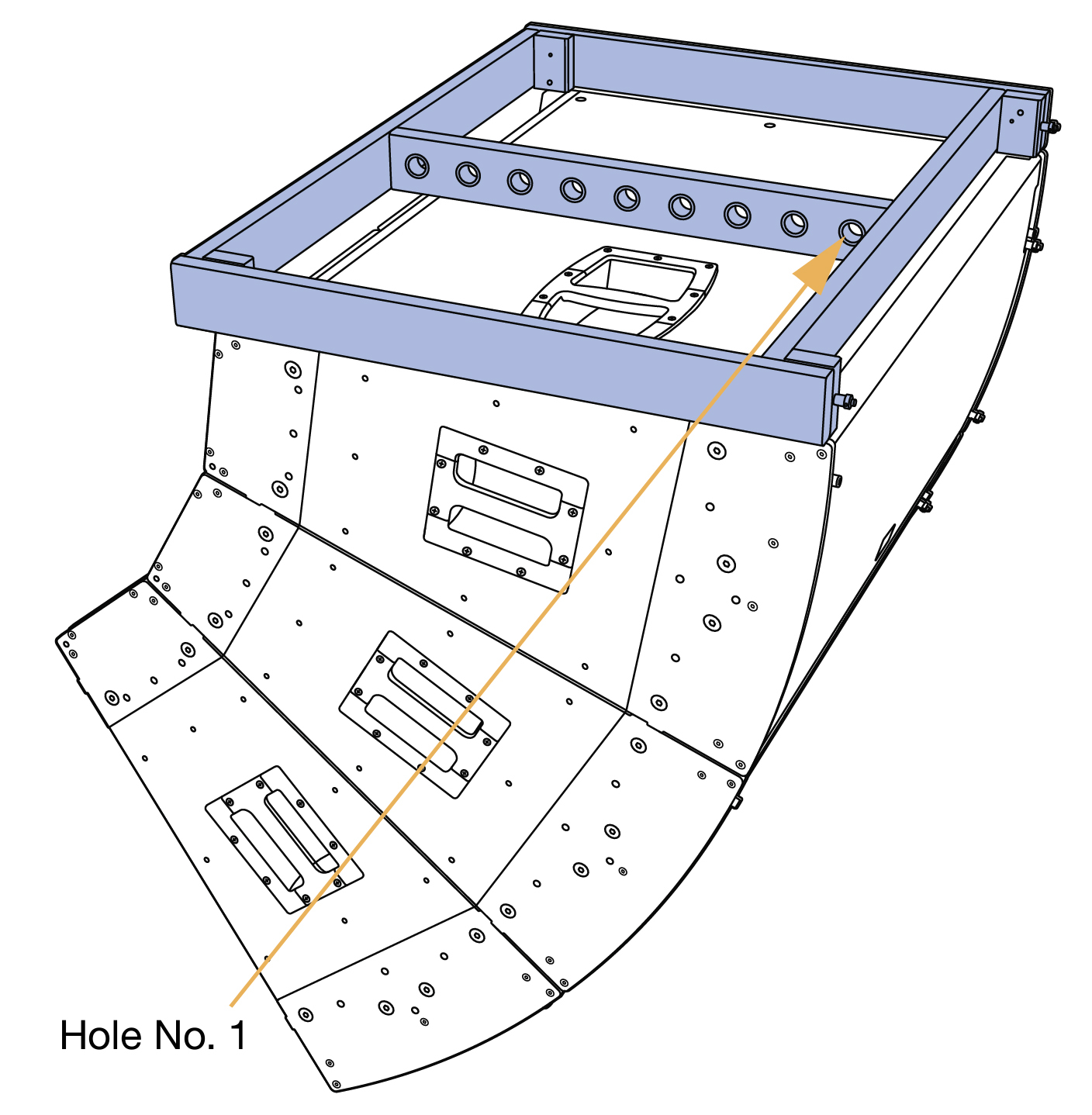 |
Figure 25: MTG-JM1 Vertical Grid with Three JM-1Ps
Rotating the Meyer Sound Logo
To accommodate the orientation of the JM-1P, the Meyer Sound logo on the unit’s grille frame can be rotated.
To rotate the Meyer Sound logo on the JM-1P grille frame:
Pull up on the logo, rotate it to the desired position, and release.
Angles Achievable with MTG-JM1 Vertical Grid—Vertical Arrays
The uptilt and downtilt angles achievable with the JM-1P are determined by the MTG-JM1 pickup hole used and the number of loudspeakers suspended. The table below provides a list of resulting angles using a single pickup point.
Number of JM-1P | Vertical Grid Hole (counting from front of loudspeaker cabinet. | ||||||||
|---|---|---|---|---|---|---|---|---|---|
1 | 2 | 3 | 4 | 5 | 6 | 7 | 8 | 9 | |
1 | NA | NA | 34.2 | 12.7 | -13.6 | -34.6 | NA | NA | NA |
1 | NA | NA | 24.2 | 2.7 | -23.6 | -44.6 | NA | NA | NA |
2 | NA | 36 | 26.5 | 14.8 | 1.6 | -11.7 | -23.9 | -34 | NA |
2 | NA | 26 | 16.5 | 4.8 | -8.4 | -21.7 | -33.9 | -44 | NA |
3 | NA | 34.9 | 28 | 20.1 | 11.4 | 2.1 | -7.1 | -16.3 | -24.7 |
3 | NA | 24.9 | 18 | 10.1 | 1.4 | -7.9 | -17.1 | -26.3 | -34.7 |
4 | NA | NA | 31.9 | 26.1 | 19.6 | 12.6 | 5.2 | -2.4 | -10.2 |
4 | NA | NA | 21.9 | 16.1 | 9.6 | 2.6 | -4.8 | -12.4 | -20.2 |
5 | NA | NA | NA | 31.8 | 27.1 | 21.4 | 15.7 | 9.2 | 2.7 |
5 | NA | NA | NA | 21.8 | 17.1 | 11.4 | 5.7 | -0.8 | -7.3 |
6 | NA | NA | NA | NA | 34.4 | 29.9 | 24.8 | 19.5 | 13.3 |
6 | NA | NA | NA | NA | 24.4 | 19.9 | 14.8 | 9.5 | 3.3 |
MDB-JM1 Dolly Board
The optional MDB-JM1 dolly board transports the JM-1P on caster wheels. Up to three dolly boards can be interlocked for transporting up to three linked JM-1Ps. The interlocked dolly boards can be oriented normally with all three units facing the same direction, or they can be staggered to occupy less space during transport.
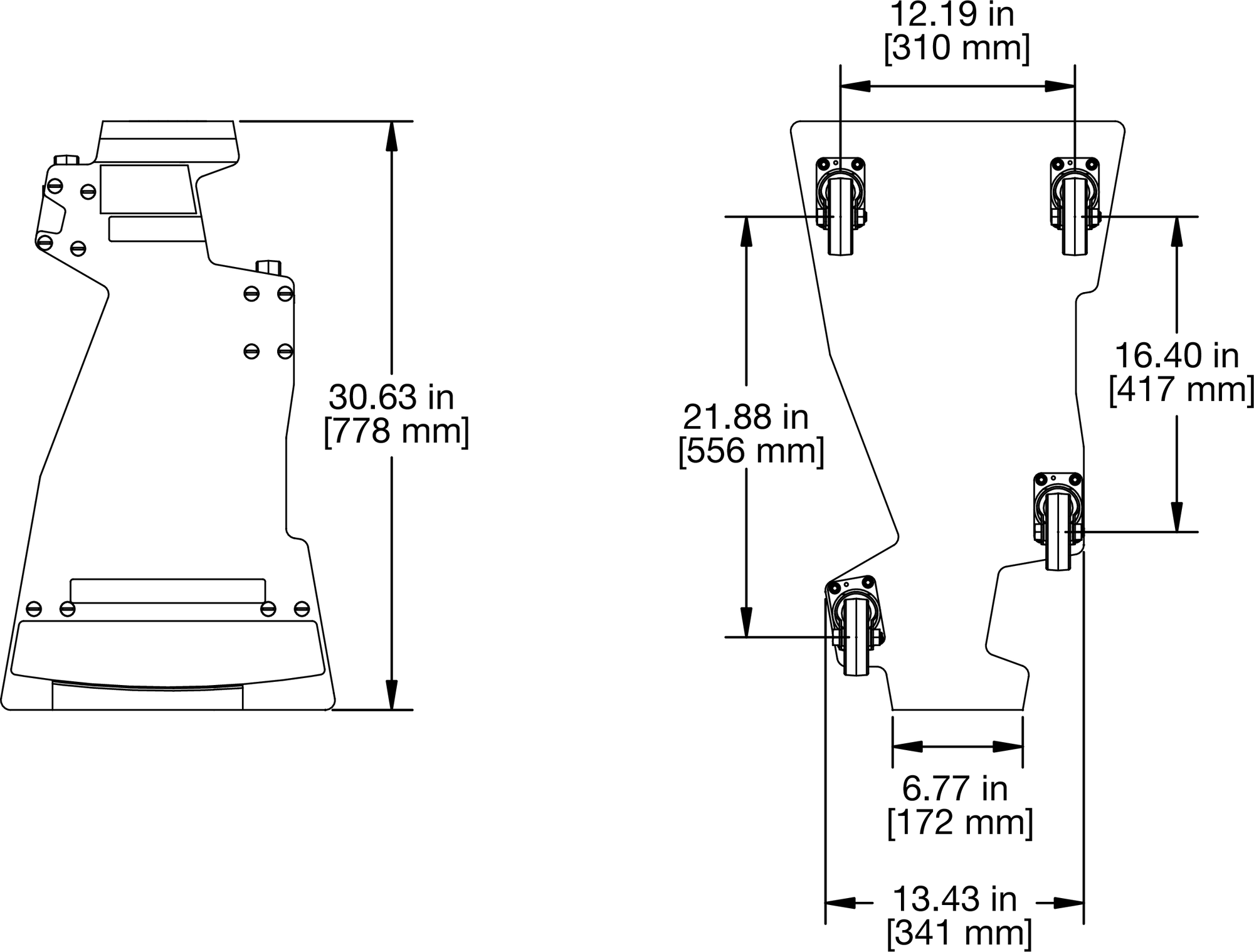 |
Figure 27: MDB-JM1 Dolly Board Dimensions
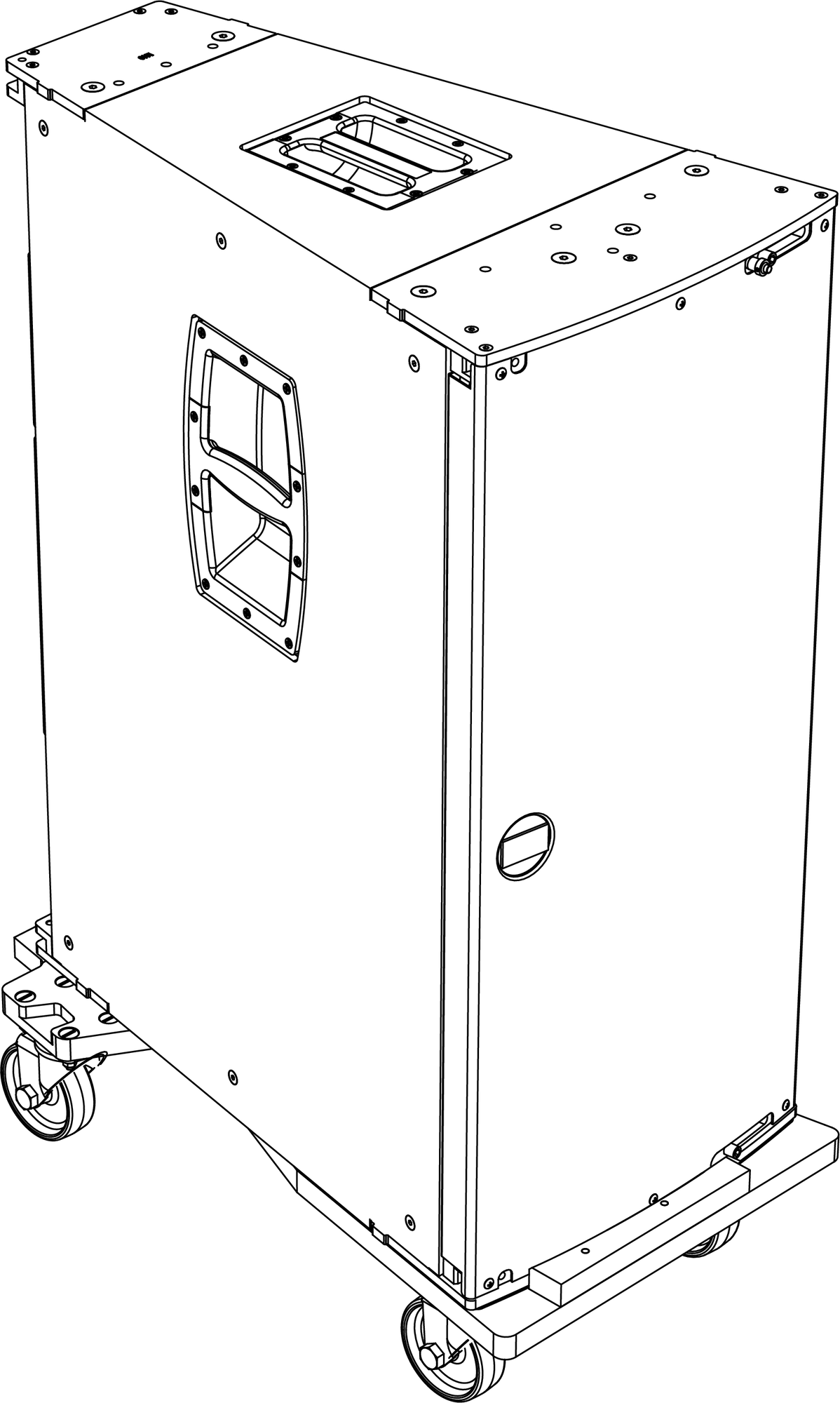 |
Figure 28: MDB-JM1 Dolly Board with JM-1P
Tip
The JM-1Ps can remain in their MDB-JM1 dolly boards during performances. When doing so, make sure the boards’ wheels are securely blocked so the units will not move.
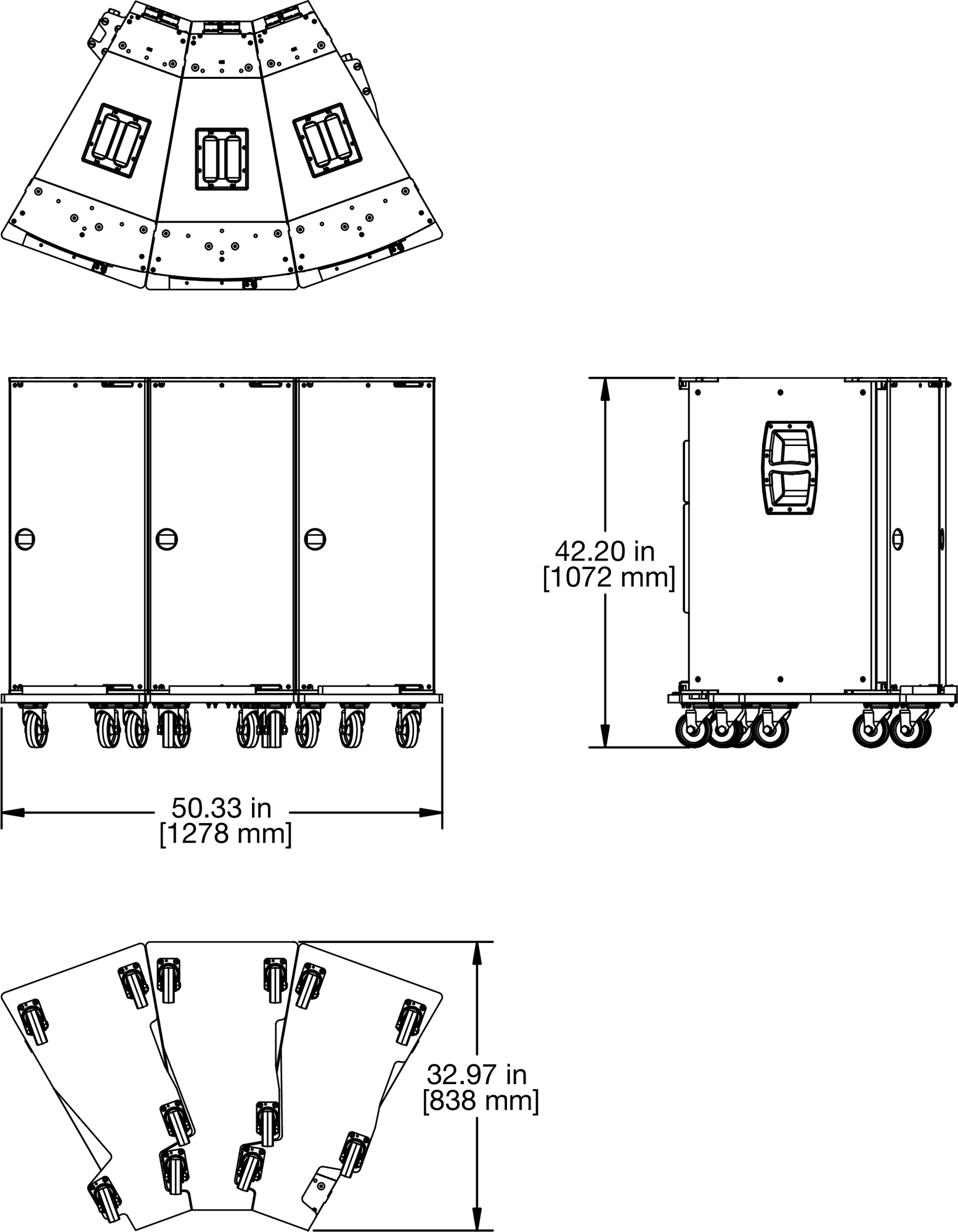 |
Figure 29: Dimensions for Three MDB-JM1 Dolly Boards, Normal
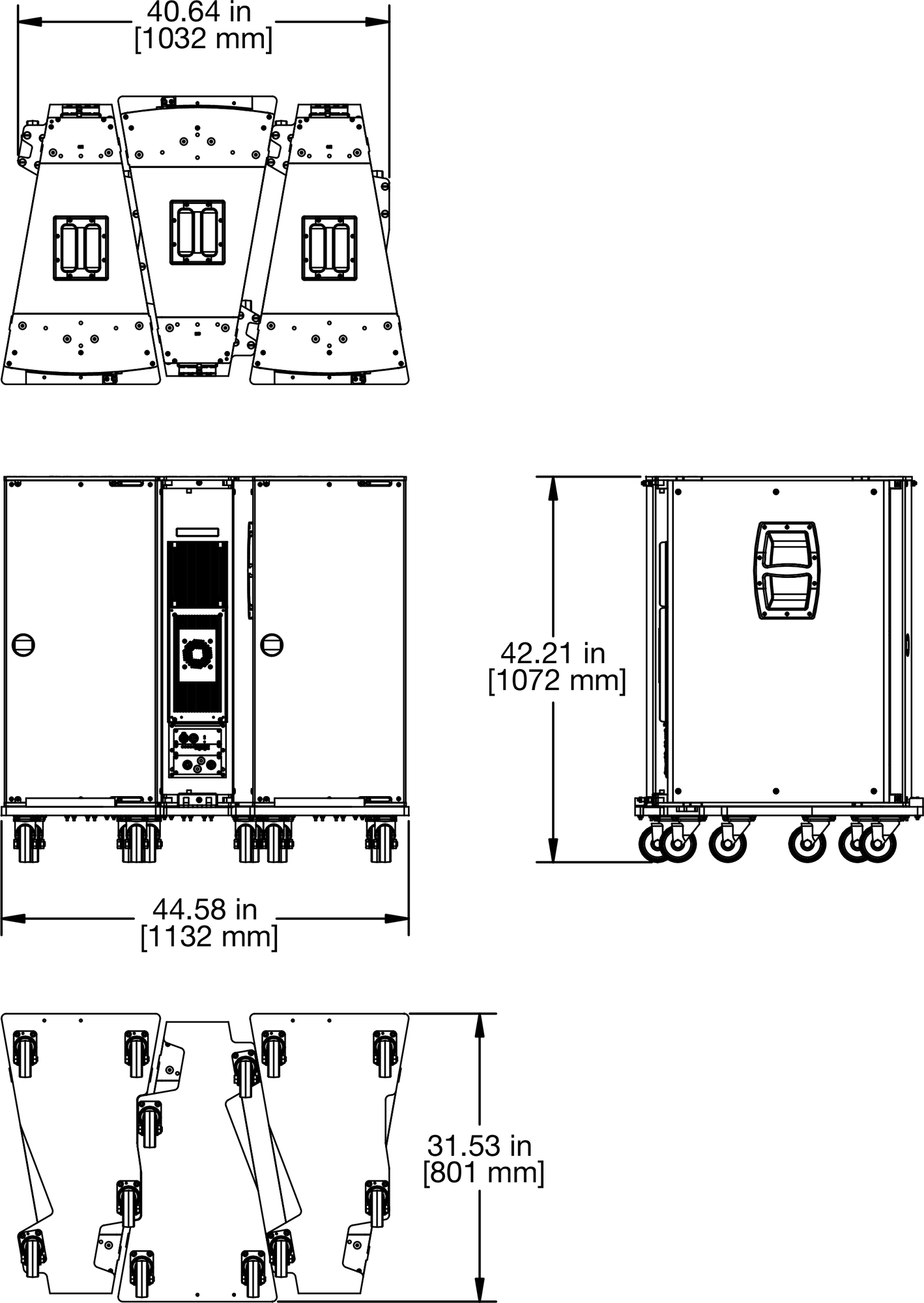 |
Figure 30: Dimensions for Three MDB-JM1 Dolly Boards, Staggered
RMS Remote Monitoring System
The JM-1P loudspeaker optionally includes an RMS remote monitoring system module, allowing it to be connected to an RMS network. RMS reports, in real time, the status and power usage of multiple Meyer Sound loudspeakers from a Mac® or Windows®-based computer. The RMServer™ communicates with Meyer Sound loudspeakers equipped with RMS modules. RMServer is a compact, Ethernet-based hardware unit with two FT-10 RMS data ports. RMServer stores system configurations internally, eliminating most manual data entry. Systems can be monitored from a computer at front-of-house or backstage, or from a laptop anywhere within the venue over WiFi.
Note
RMS does not control AC power.
Compass RMS Software
Compass RMS™ software provides extensive system status and performance data for each loudspeaker, including amplifier voltage, limiting activity, power output, heat sink temperature, fan and driver status, as well as mute and solo capability. Loudspeakers are added to the RMS network and assigned a node name during a one-time discovery procedure. Once loudspeakers are identified on the RMS network, they appear in Compass RMS as icons that can be customized, as shown in the figure below.

Compass RMS Window
Individual loudspeakers can be physically identified with the Wink option in RMS, which lights the Wink LED on the RMS module of that particular loudspeaker. Loudspeaker icons can be arranged in Compass RMS and saved as pages to represent how the loudspeakers have been deployed in the system. Multiple pages can be saved and recalled for specific performances and venues.
RMS Module
The RMS user panel includes three LEDs, two buttons, and two Network connectors.
 |
RMS Module
Note
The LEDs and buttons on the RMS user panel are used exclusively by RMS and have no effect on the acoustical or electrical activity of the loudspeaker.
Service LED (Red)
The red Service LED provides the following feedback:
When unlit, the loudspeaker is successfully connected to the network and commissioned.
When blinking once every two seconds, the loudspeaker is connected to the network but not yet commissioned in the RMS software.
When lit continuously, the loudspeaker’s RMS hardware has failed and may indicate that the module has been damaged (contact Meyer Sound Technical Support).
Service Button
Pressing the Service button identifies the loudspeaker on the RMS network and notifies the RMS software that the loudspeaker is connected. Simultaneously press the Reset and Service buttons to reset the RMS module and decommission the loudspeaker from the network (see Resetting the RMS Module).
Wink LED (Green)
The green Wink LED lights when a signal is sent from the RMS software by clicking the Wink button on the loudspeaker’s icon or on its Text view. This feature is useful for identifying the physical loudspeaker corresponding to a loudspeaker icon in the RMS software.
Reset Button
Pressing the Reset button causes the RMS module’s firmware to reboot; this action will not affect whether the loudspeaker is commissioned (which is stored in flash memory). Simultaneously press the Reset and Service buttons to reset the RMS module and decommission the loudspeaker from the network (see Resetting the RMS Module ).
Activity LED (Green)
The green Activity LED flashes continuously when the loudspeaker has been successfully commissioned.
RMS Network Connectors
The Weidmuller 2-conductor, locking connectors transfer data to and from the RMS network. Two connectors are provided to allow for easy connection of multiple (daisy-chained) loudspeakers on the network. Included with each RMS-equipped loudspeaker are RMS cable connectors and mounting blocks for constructing RMS cables. The mounting blocks allow the Weidmuller connectors to be securely attached to the RMS module with screws.
Neuron ID for RMS Module
Each RMS module has a unique 12-character Neuron ID (NID) that identifies the loudspeaker on the network. The NID is automatically detected by RMServer but can also be entered manually, if necessary when configuring RMS systems in Compass RMS without loudspeakers present. The NID label is located on the RMS user panel near the orange Network connectors.
Resetting the RMS Module
You can use the Identify button to reset the RMS module when powering on the loudspeaker. This action will cause the module to be removed from the RMS network.
Power down the loudspeaker.
Press and hold the Identify button.
While continuing to hold down the Identify button, power on the loudspeaker.
After the Wink/Status LED flashes on and off, release the Identify button. The RMS module is reset and the loudspeaker is removed from the RMS network.
System Design and Integration Tools
MAPP System Design Tool
The MAPP System Design Tool is a powerful, cross-platform application for accurately predicting the coverage pattern, frequency response, phase response, impulse response, and SPL capability of individual or arrayed Meyer Sound loudspeakers.

MAPP System Design Tool
Whether planning for fixed installations or for tours with multiple venues, use MAPP to accurately predict the appropriate loudspeaker deployment for each job, complete with coverage data, system delay and equalization settings, rigging information, and detailed design illustrations. MAPP’s accurate, high-resolution predictions ensure that systems will perform as intended, thereby eliminating unexpected coverage problems and minimizing onsite adjustments.
The key to the accuracy of MAPP’s predictions is MeyerSound’s exhaustive database of loudspeaker measurements. Performance predictions for each loudspeaker are based on 3-dimensional, 65,000+ 1/48th-octave-band measurements taken in the MeyerSound anechoic chamber. The extraordinary consistency between Meyer Sound loudspeakers guarantees that predictions from MAPP will closely match their actual performance.
MAPP software allows for configuration of MeyerSound loudspeaker systems and definition of the environment in which they operate, including air temperature, pressure, humidity, and the location of prediction surfaces. Importing both CAD (.DXF) and Sketchup (.SKP) files containing detailed venue information to act as an anchor model to the prediction surfaces and a visual aid to facilitate prediction data interpretation is also possible.
Tip
See meyersound.com for support and more information about MAPP.
MAPP Capabilities
With MAPP, you can:
Simulate different loudspeaker configurations to refine system designs and determine the best coverage for intended audience areas
Model loudspeaker interactions to locate constructive and destructive interferences so that loudspeakers can be re-aimed and repositioned as necessary
Place microphones anywhere in the Model View space and predict loudspeaker frequency response, phase response, and sound pressure levels at each microphone position
Determine delay settings for fill loudspeakers using the Inverse Fast Fourier Transform and phase response feature
Preview the results of signal processing to determine optimum settings for the best system response
Automatically calculate load information for arrays to determine necessary minimum rigging capacity, front-to-back weight distribution, and center of gravity location
Generate and export system images and system PDF reports for client presentations
Synchronize GALAXY processor output channel settings in real-time with virtual or real GALAXY units, allowing in-the-field changes to be predicted during system alignments
Galileo GALAXY Network Platform
The Galileo GALAXY Network Platform is a sophisticated loudspeaker management tool for controlling all MeyerSound speaker types. The GALAXY loudspeaker processor extends a high level of audio control in driving and aligning loudspeaker systems with multiple zones. It provides a powerful tool set for corrective equalization (EQ) and creative fine-tuning for a full range of applications from touring to cinema.
Users can readily program the GALAXY processor using Compass software running on a host computer or via the Compass Go application for the iPad. Connecting MAPP to the GALAXY processor will also allow the user to push output channel settings created in MAPP as a starting point. Compass Control Software includes custom-designed settings for each family of speakers, as well as to integrate families together. For example, the Product Integration feature matches the phase characteristics between Meyer speaker families to ensure the most coherent summation.
Processing tools for inputs and outputs include delay, parametric EQ and U-Shaping EQ. Output processing also includes polarity reversal, Low-Mid Beam Control (LMBC), atmospheric correction, and All Pass filters.
The built-in summing and delay matrices allow a user to easily assign gain and delay values, respectively, at each cross point. This capability greatly facilitates using one loudspeaker to satisfy multiple purposes.
Front panel controls let a user intuitively and quickly operate a GALAXY processor without a computer during live use.
The GALAXY 408, GALAXY 816 and GALAXY 816-AES3 processor versions have the same audio processing capability with different I/O. See www.meyersound.com to locate their datasheets for more information.
Optional Rain Hoods
A weather-protected version of the high-impact JM-1P is available with rain hood kits that safeguard the loudspeaker’s electronics from the elements in fixed, outdoor installations. The rain hood is available in both vertical (PN 40.185.038.01) and horizontal (PN 40.185.084.02) versions. The rain hood kits are comprised of an upper rain hood that protects the heat sink, and a lower rain hood that protects the user panel and connectors. The rain hoods are made of a durable, high-impact polycarbonate that is also transparent, allowing the loudspeaker's connections and LEDs to be visible.
Vertical Rain Hood Kit Contents
The JM-1P vertical rain hood is used when the loudspeaker is oriented vertically. The JM-1P vertical rain hood kit (PN 40.185.084.01) includes the following parts:
Part | Part Number | Quant. |
|---|---|---|
Upper rain hood assembly | 45.185.084.02 | 1 |
Upper rain hood frame | 45.185.084.01 | 1 |
Lower rain hood assembly | 45.152.031.01 | 1 |
Flat head screws, 8-32 x 0.25 inch | 101.838 | 4 |
Pan head screws, 8-32 x 0.50 inch | 101.008 | 2 |
Lock pins, 5/16 inch x 0.63 inch | 134.024 | 2 |
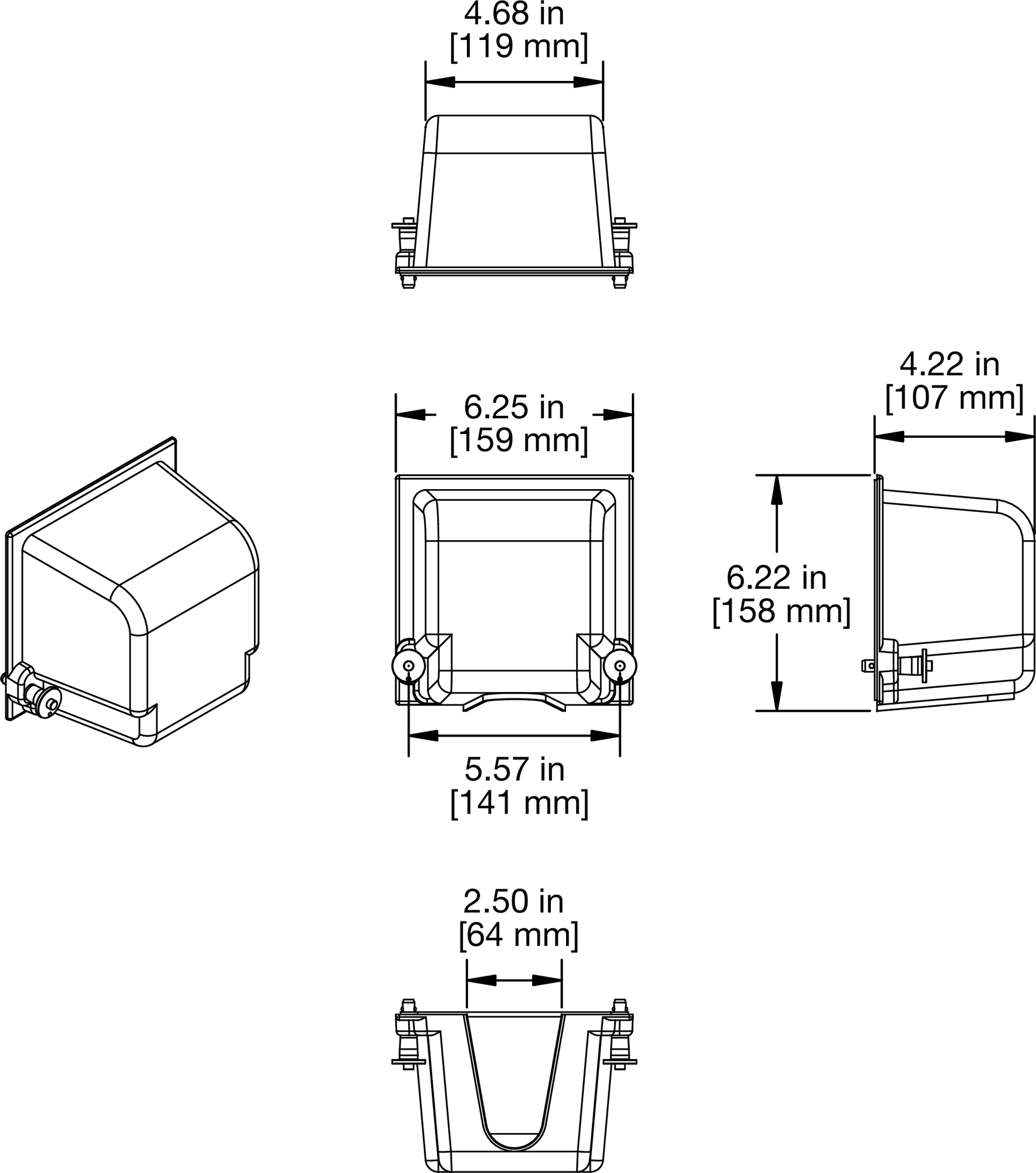 |
Vertical Rain Hood Dimensions: Lower Rain Hood Assembly
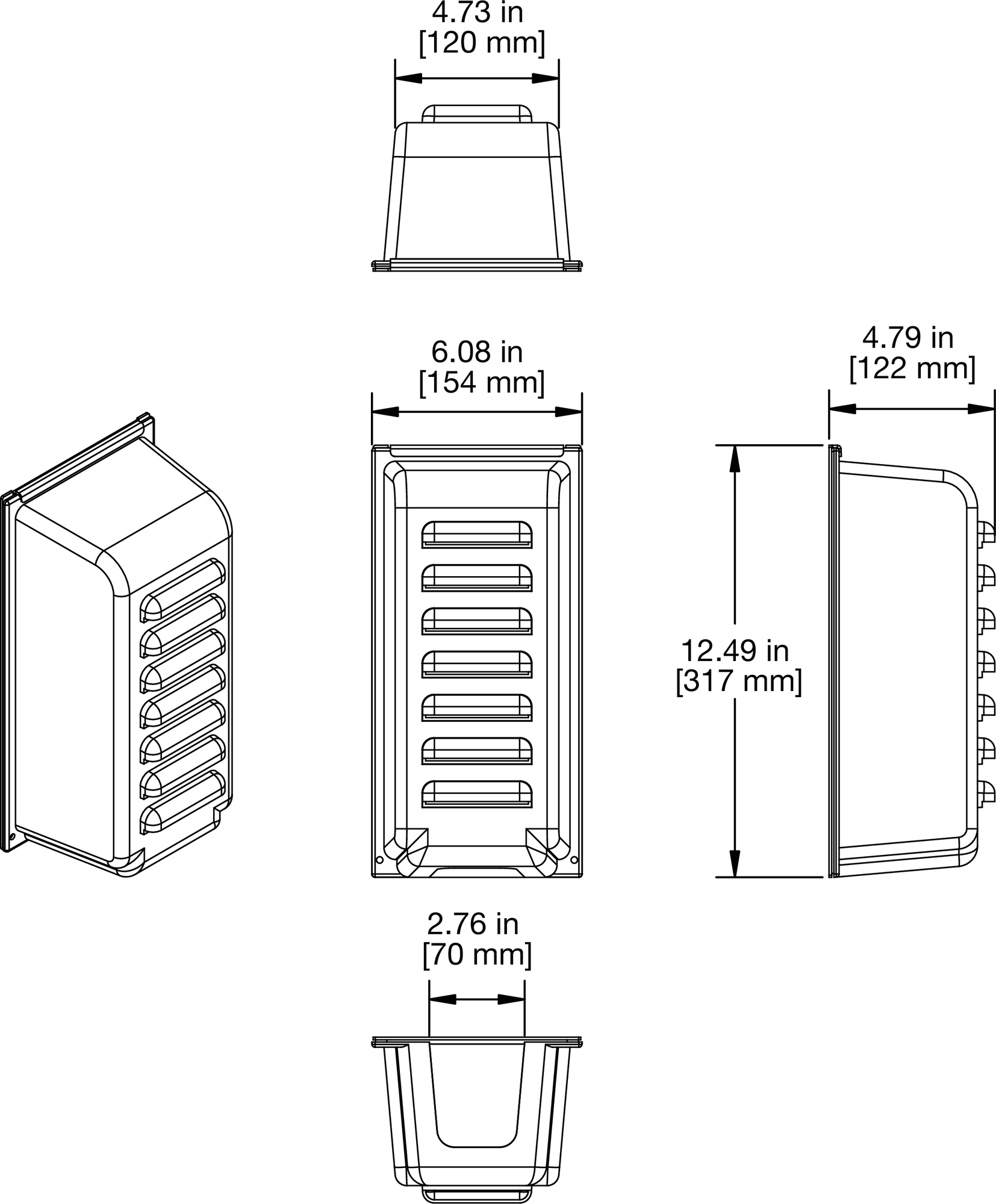 |
Vertical Rain Hood Dimensions: Upper Rain Hood Assembly
Installing the Vertical Rain Hood
Attach any required cables to the loudspeaker and orient it vertically.
Remove the bottom two pan head screws from the amplifier face.
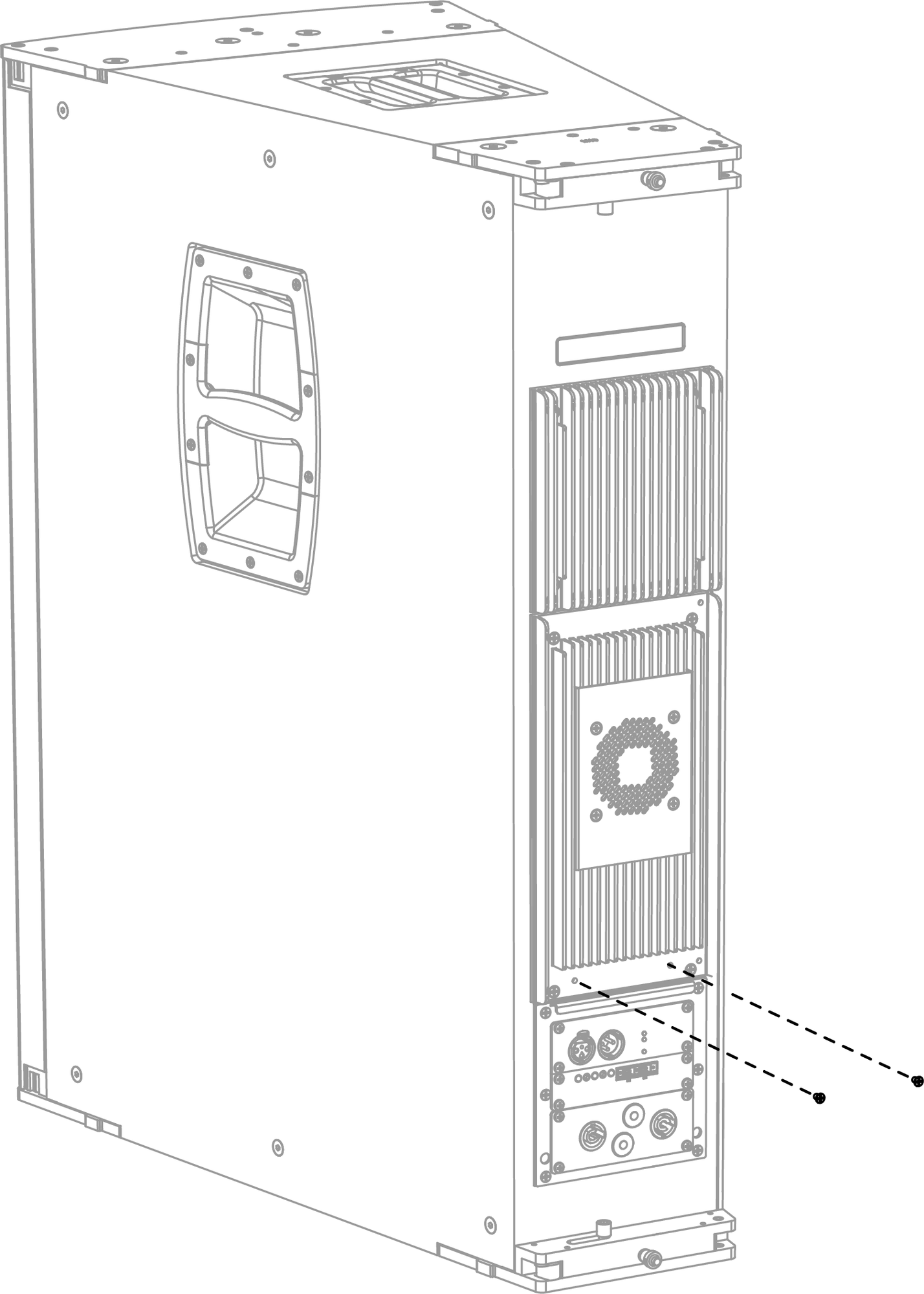
Removing Two Screws on Amplifier Face
Secure the upper rain hood frame to the amplifier face with the four 8-32 x 0.25 flat head screws, two at the top and two at the bottom.
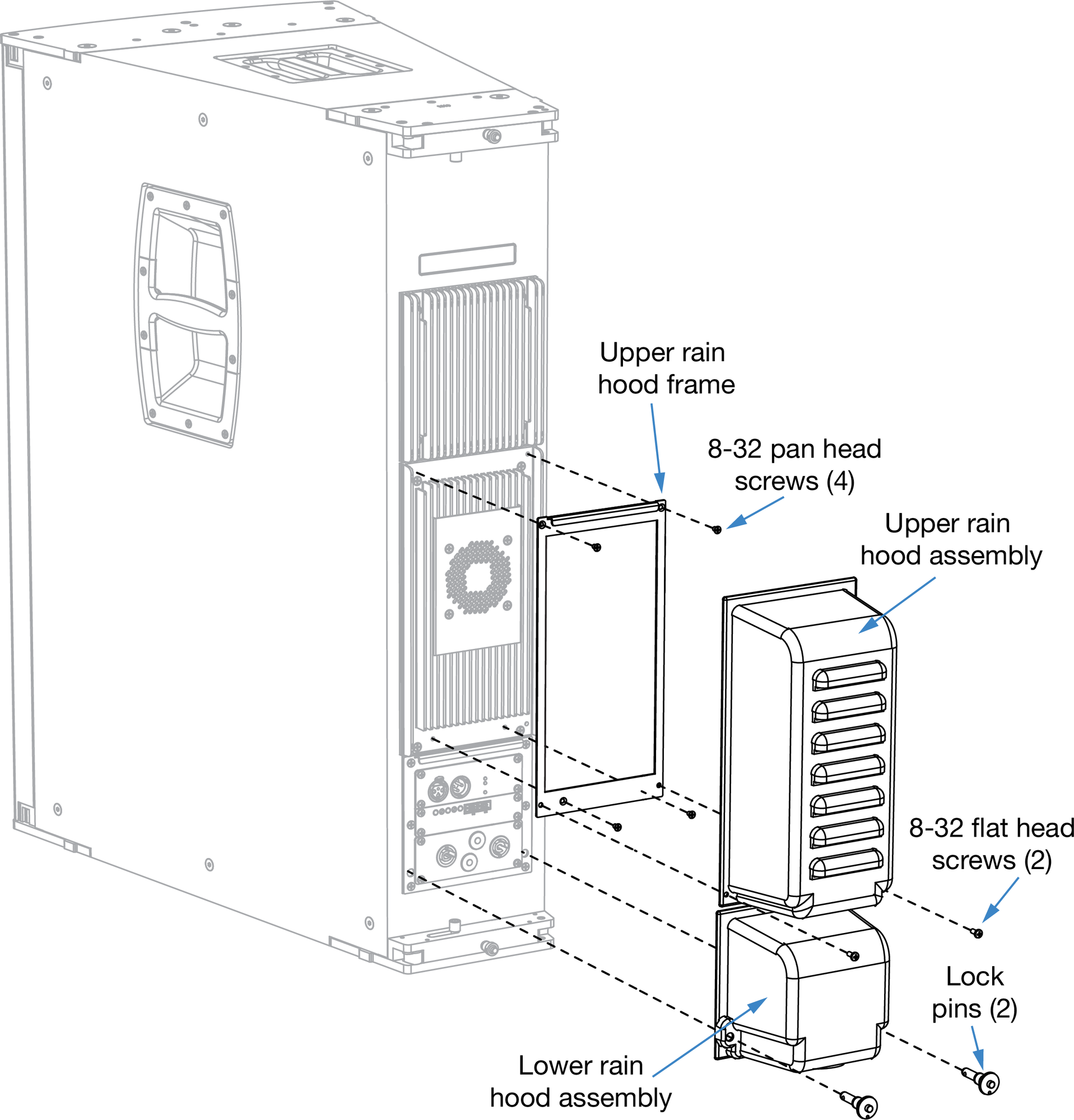
JM-1P Vertical Rain Hood Installation
Attach the upper rain hood assembly to the upper rain hood frame, slipping it under the frame's top flange and securing it to the bottom of the frame with the two 8-32 x .50 pan head screws.
Attach the lower rain hood assembly to the user panel, slipping it under the flange at the top of the user panel and securing it to the bottom of the panel with the two lock pins.
Note
The vertical rain hood should only be used when the loudspeaker is oriented vertically (see the figure above).
For permanent, fixed outdoor installations, both the lower and upper rain hood assemblies should be installed. For touring applications, the upper rain hood assembly can be removed, since the heat sinks and fan and can be safely exposed to occasional rain. However, for all outdoor applications, the lower rain hood assembly should always be installed to shield the unit’s connectors from rain.
Horizontal Rain Hood Kit Contents
The JM-1P horizontal rain hood is used when the loudspeaker is oriented vertically. The JM-1P horizontal rain hood kit (PN 40.185.084.02) includes the following parts:
Part | Part Number | Quant. |
|---|---|---|
Upper rain hood assembly | 45.185.089.01 | 1 |
Upper rain hood frame | 45.185.084.01 | 1 |
Lower rain hood assembly | 45.185.090.01 | 1 |
Flat head screws, 8-32 x 0.25 inch | 101.838 | 4 |
Pan head screws, 8-32 x 0.50 inch | 101.008 | 2 |
Lock pins, 5/16 inch x 0.63 inch | 134.024 | 2 |
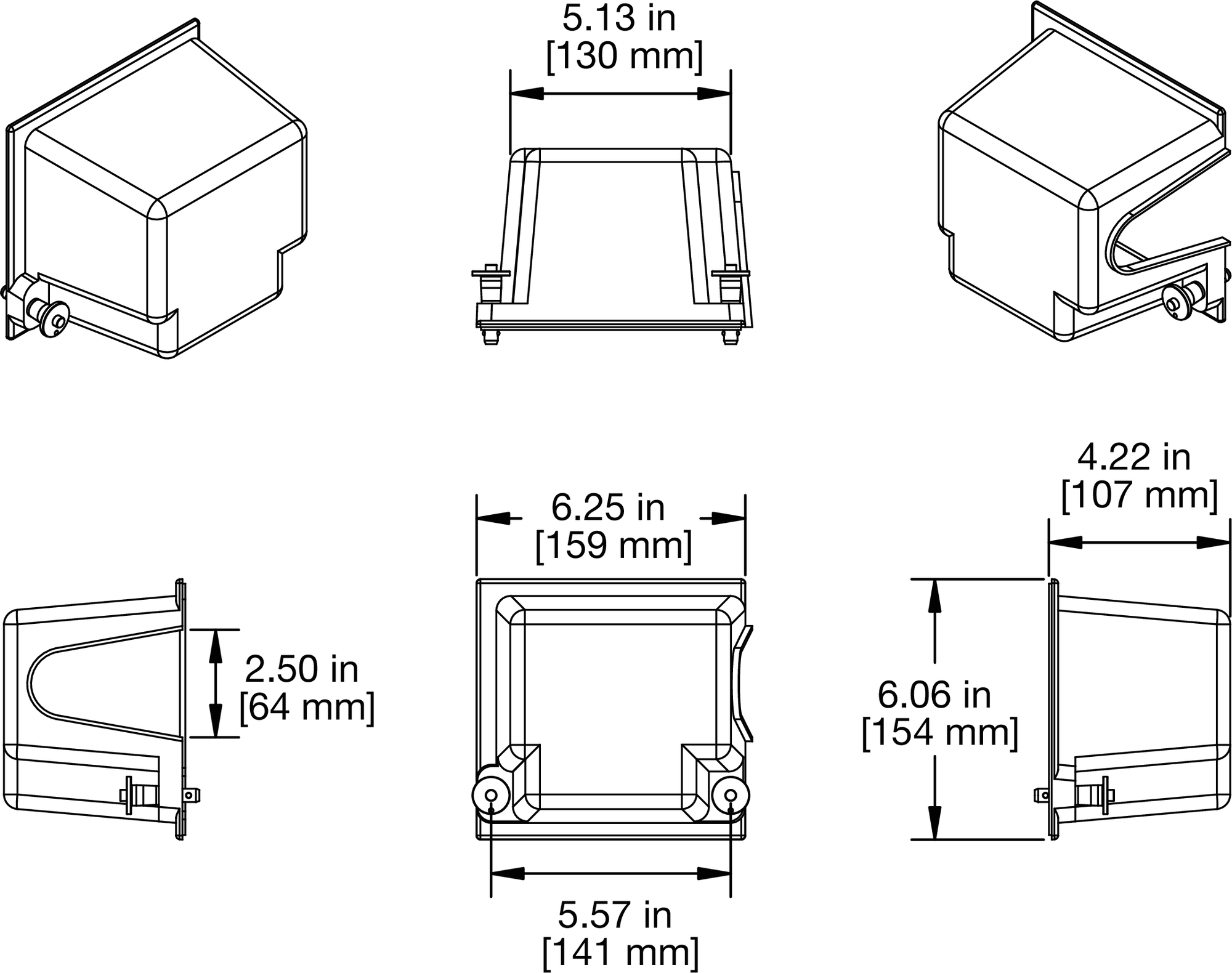 |
Horizontal Rain Hood Dimensions: Lower Rain Hood Assembly
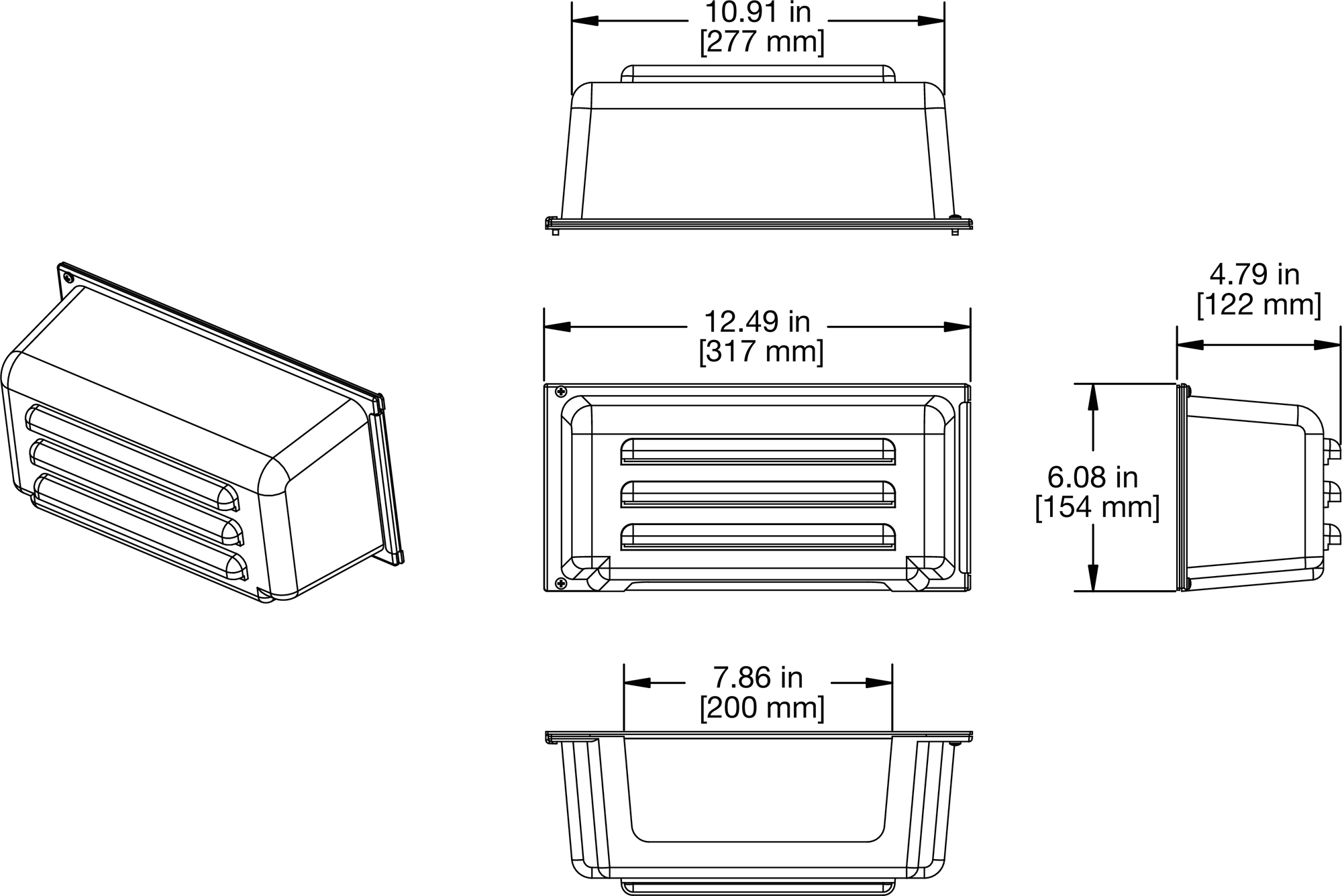 |
Horizontal Rain Hood Dimensions: Upper Rain Hood Assembly
Installing the Horizontal Rain Hood
Attach any required cables to the loudspeaker and orient it horizontally.
Remove the bottom two pan head screws from the amplifier face.
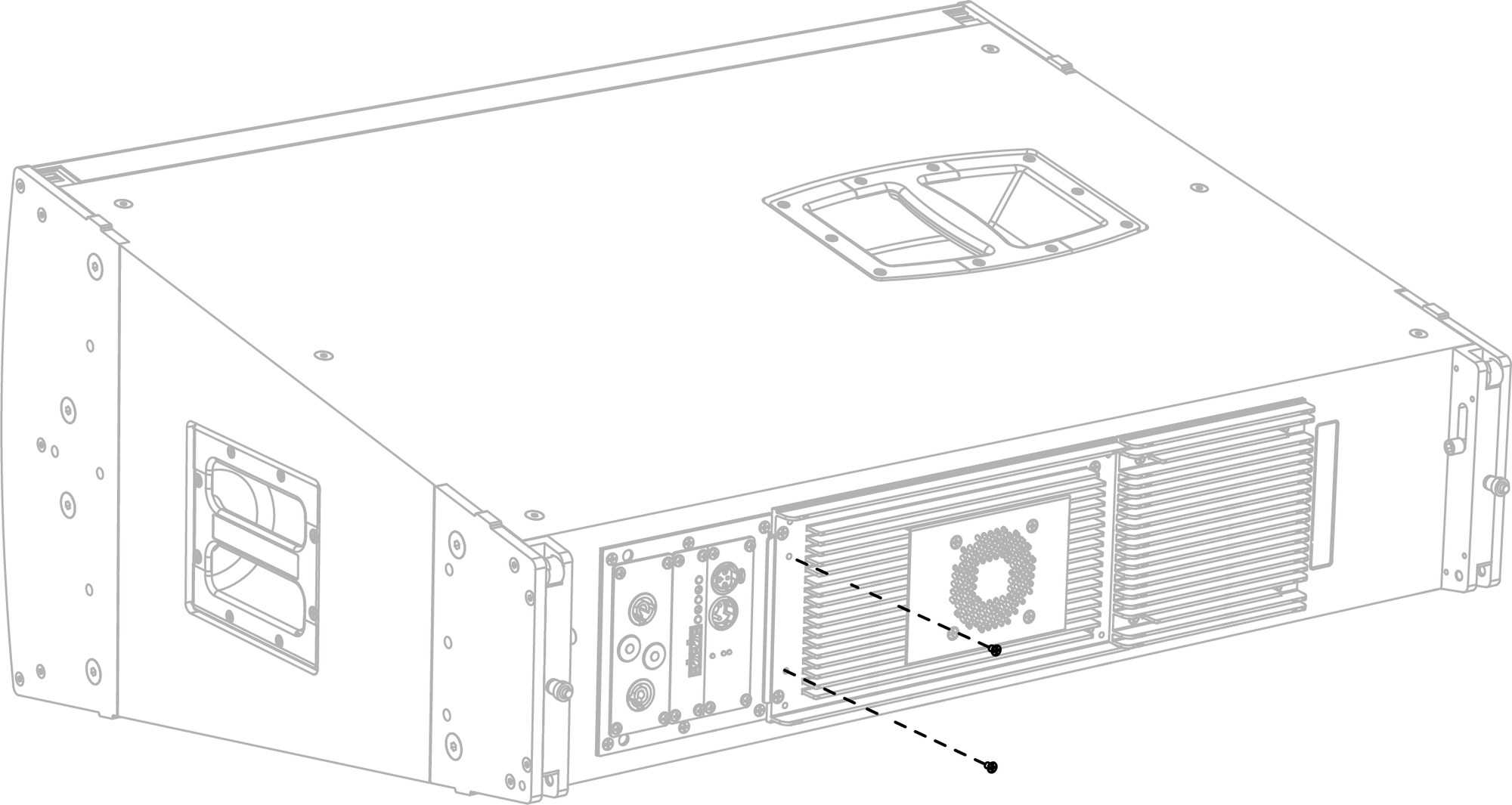
Removing Two Screws from Amplifier Face
Secure the upper rain hood frame to the amplifier face with the four 8-32 x 0.25 flat head screws, two at the top and two at the bottom.
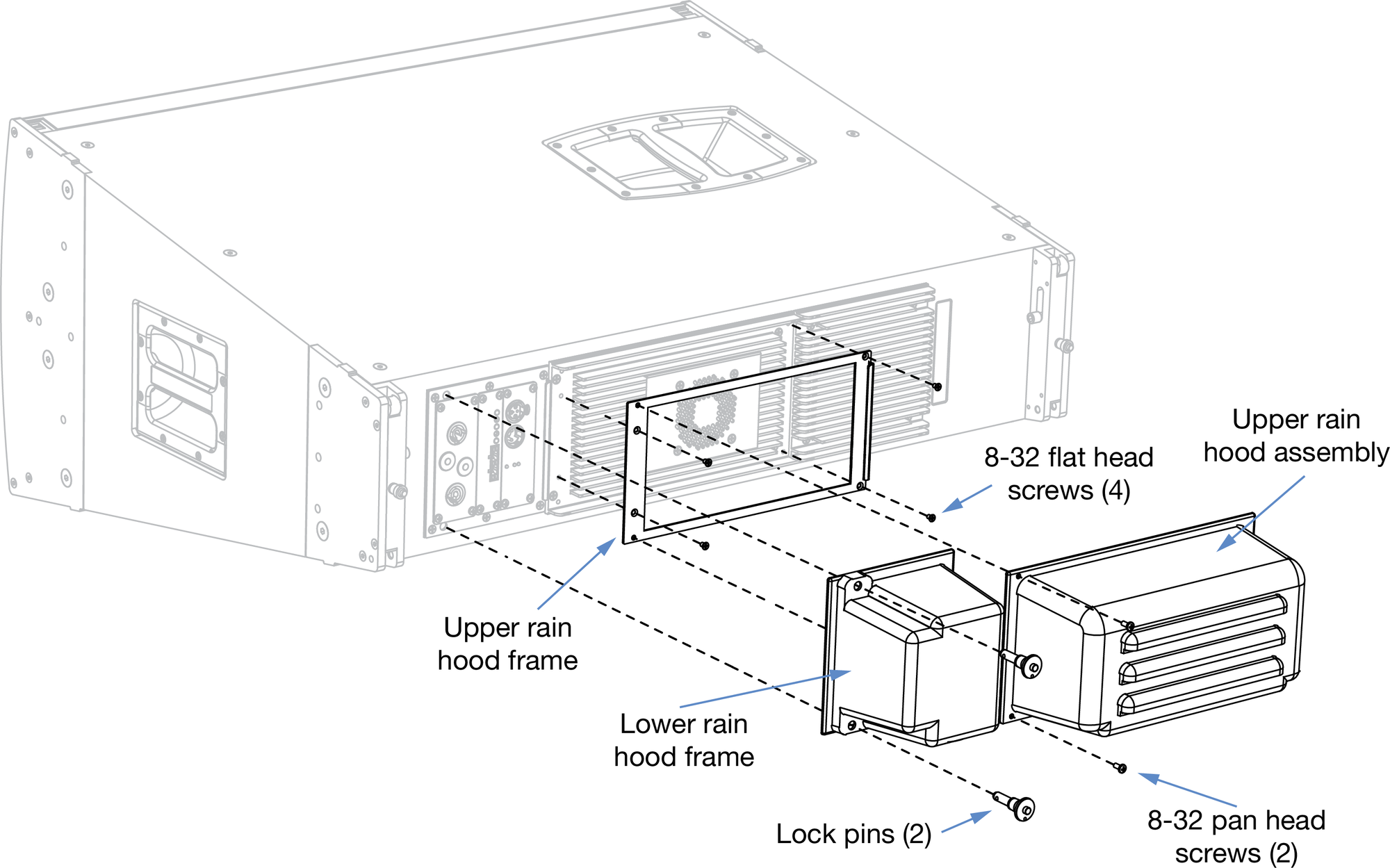
JM-1P Horizontal Rain Hood Installation
Attach the upper rain hood assembly to the upper rain hood frame, slipping it under the frame's top flange and securing it to the bottom of the frame with the two at the bottom.
Attach the lower rain hood assembly to the user panel, slipping it under the flange at the top of the user panel and securing it to the bottom of the panel with the two lock pins.
Note
The horizontal rain hood should only be used when the loudspeaker is oriented horizontally (see the figure above).
For permanent, fixed outdoor installations, both the lower and upper rain hood assemblies should be installed. For touring applications, the upper rain hood assembly can be removed, since the heat sinks and fan and can be safely exposed to occasional rain. However, for all outdoor applications, the lower rain hood assembly should always be installed to shield the unit’s connectors from rain.
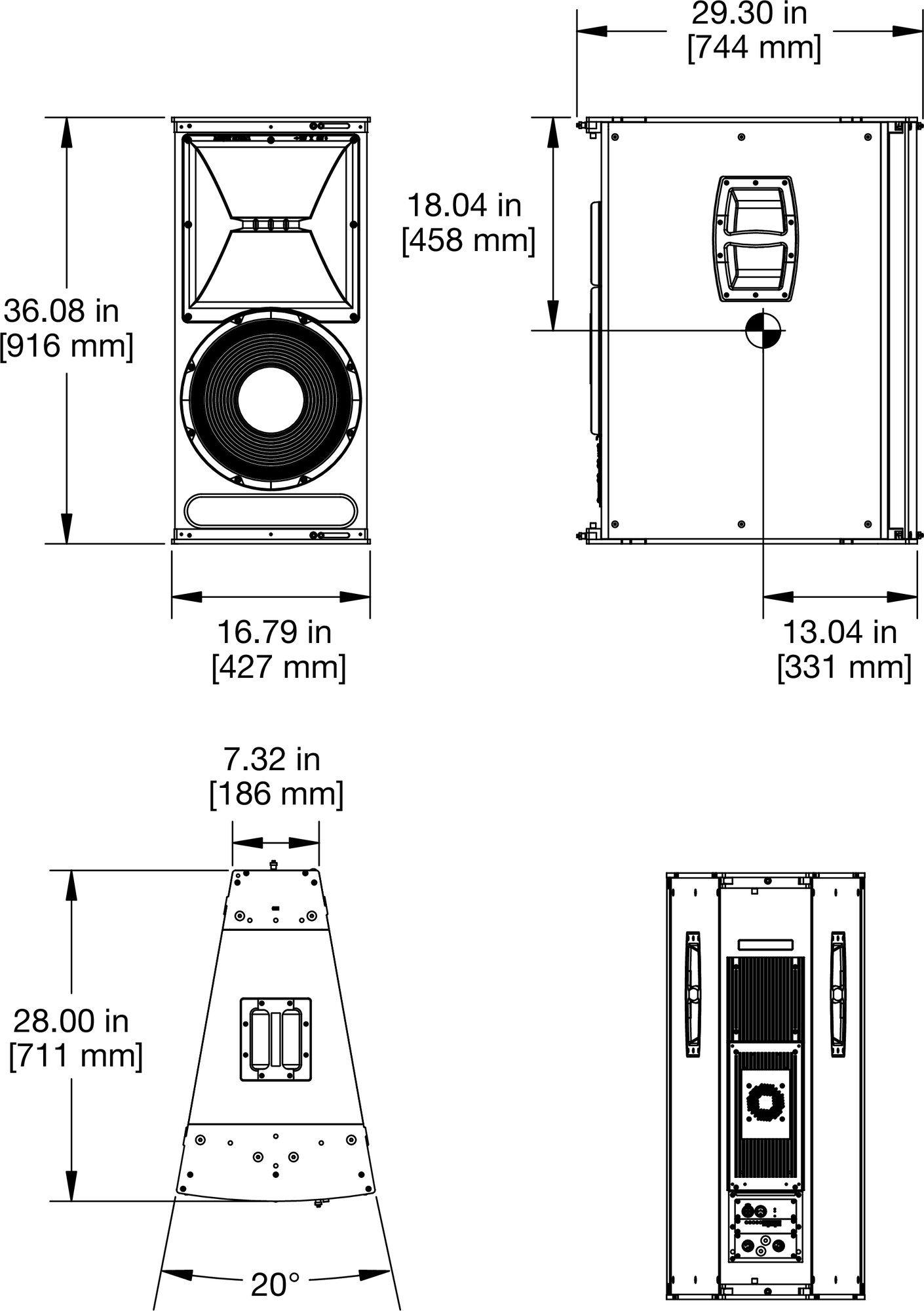
JM-1P Dimensions